UPDATE: Several reviews have come out about the Chromecast. Since I haven't dedicated the $35 to purchasing one myself, I'll defer to David Pogue.
Chromecast: is it a game changer? The public is eating it up. It's definitely a game changer. But to understand how it's going to affect things, you have to think about how Apple has been going about the same thing. For years now, Apple has had a 'pet project' called AppleTV. It has never been on the front line of Apple's advertising. There have even been several analysts over the years that have predicted the doom of AppleTV. Apple has persisted though without really highlighting AppleTV. AirPlay was available through the iOS devices, but was mainly used for streaming music. It was a cool feature but not a wave maker.
When the iPhone 5 and iPad 3 came out, they both had AirPlay, which meant that anyone who already had an AppleTV could mirror their screen to their big screen TV. This was a significant event and clearly showed Apple's desire to get into the living room. They've since released newer updated hardware and software for the little device. You can watch Hulu, Netflix, HBO, and a bunch of other content, as long as your have an account. Recently, an iOS game developer released a game that really doesn't work without mirroring. It's a tennis game much like the game that comes with the Wii. The difference is that you play with your phone as the controller using its internal accelerometers and gyroscopes to detect your motion. The video is displayed on your phone, but that doesn't really work when you're swinging your phone around like a tennis racket. However, if you mirror your phone to your AppleTV, you essentially get the same game that came with the first generation Wii. This game opens the door for other games that can be built in the same way. All the work is being done on the phone/controller in your hand, while the video is mirrored up to the big screen. The next advance I expect to see from Airplay is the ability to mirror multiple devices to the same AppleTV. Putting two people's phones' screens on a single TV gives multiplayer games a chance (imagine Mario cart but using your phone as the steering wheel).
Then Google released Chromecast. It's 1/3 the cost of the AppleTV and seems to work across different platforms. If you only look at the Chrome browser mirroring capabilities, this is huge. All the things that can be done in a Chrome browser can now be done on a big screen TV while not requiring any extra remote controls much in the same was as Airplay does for Apple phones' screens. While Chromecast appears to compete directly with AppleTV given all the current features, there's more to it than that. AppleTV and Chromecast are on the same trajectory. While Google was late to the phone game joining in only after Apple already had a tight grip on the market, they came to the table much sooner with Chromecast.
The other major factor here is that Airplay for Apple iOS devices only works with mobile devices. Chromecast promises to work not only using any mobile device but also PC computers with the Chrome browser installed. This means that all the content that people currently consume using their PC can now be consumed on their TV. This may not seem big, but given the cheap entry point, Chromecast could easily be used as a secondary monitor for every device in the house.
On top of that, since Chromecast can mirror anything from the Chrome browser, much content that has had a hard time breaking into the living room now has a direct link. For example, Hulu has two services, free and paid (Hulu Plus). The paid service doesn't have much content that the free service doesn't. There's a little, but it's not really what subscribers are paying for. Hulu Plus subscribers have the ability to stream Hulu content on just about any device they can get their hands on. Hulu free users can only get content through their browser (but not a browser on a mobile device). With Chromecast, users can easily use the free Hulu service but still view it on their TV without hooking up a PC. This means that Hulu will need to reevaluate what users are really paying for. At $8 a month, a one time investment of $35 for Chromecast not only will pay for itself in 5 months, but will get me pretty much the same content with little extra hassle.
Yes, Chromecast is a game changer. At $35, it's cheap enough to give it a chance even if it doesn't eventually work out. It's not like the $99 investment in an AppleTV.
Thursday, July 25, 2013


Tuesday, July 23, 2013
BTSync: A new alternative to cloud based drive services
In a previous post, I wrote about how to connect your system folders (My Documents, My Pictures, etc.) to a Google Drive/Dropbox/Skydrive account. The benefit of this is that you always have a backup available on the web. If my hard drive were to die today, I wouldn't be too bad off since all I need to do is download the Google Drive desktop app and redirect my system folders to my Google Drive folder. All my stuff would come back like it was never gone. I'd still have to install applications but that's not too bad. It's nice every once in a very long while to lose all my programs. It forces me to trim the fat or look for better versions of the apps I use (Like Paint.Net or Notepad++).
1Without paying anything
2Shared with Gmail and Google+ Hi Res Photos
3Although pretty easy
4If you have a paid subscription to Office360
5Not necessarily Gmail users, but anyone with a Google account
So, let me highlight some of the reasons that BTSync intrigues me. First of all, there is no limit to the amount of content that can be synchronized. This is mainly due to the fact that your sync'd files are not stored on some limited corporate server somewhere, they're stored only on the systems where your files are synchronized. This is a double edged knife, however. While Cloud based drives can be used for backup, BTSync doesn't back your content up to the internet. If you add a folder to BTSync only on one computer, the files aren't copied anywhere. So, unlimited size but no storage on any corporate servers. That may be two advantages in some peoples' books.
Unlike most of the corporate cloud based drives, BTSync is only about the file transfers. As such, there are no online editors for your files. However, since there is no web access to your files (because they're not on any corporate server) you'll only be accessing your files from your desktop. You can install any office productivity suite locally (or even use google docs in a roundabout way).
Sharing is another feature that is different from other offerings. While other offerings essentially require you to have an account in order to have RW access to a shared folder, BTSync will allow anyone with the app to access/sync your folder as long as they have the secret, a special, very long, very complicated password. If you give another person the secret to your folder, they can sync your folder with a folder on their computer. Any changes either of you make will be reflected in the other's sync'd folder.
You can however, give out two other types of secrets: a read only secret and a one time secret. The RO secret allows the person to whom you give it to sync your folder to a folder on their system, but they won't be able to make changes to your folder. This is a good way of distributing files to friends. For example, you could setup your pictures folder and hand out the RO secret to family members. They would then get copies of any pictures you put in your pictures folder (think of doing this with your iCloud Photo Stream).
Have you started thinking about the possibilities yet?
Another thing I did right away with BTSync was to synchronize my Dosbox working directory across all my PCs. I play retro DOS games every once in a while. By synchronizing the working directory for Dosbox (a DOS emulator) I can access the games, save files, and anything else on any of my computers. This allows me to play a game on my desktop then save the game, exit Dosbox, go to the living room and launch Dosbox and pick up the saved game right where I left off.
I'm hosting a LAN party this weekend. I setup a folder where I intend to put all the installers and files needed (including my dosbox folder). I've added it to BTSync and will hand out the RO key via Facebook and email to everybody coming to the party. That way they can install the games ahead of time to make sure they work.
Another idea I had was to use BTSync to replace NQSync (which I had originally intended to write using the bittorrent protocol anyway).
One more feature then I'm done. I promise.
In my previous post, I talked about changing the default location of system folders. This is necessary since most cloud drives require the sync'd files to be in a particular folder. So I have to move my system folders to that sync'd folder in order to get them to sync. With BTSync, I don't have to move the folders. I can setup each folder in BTSync without moving it. This means that I don't have to move anything, I don't have to change Windows configurations, or anything.
I haven't done it yet, but I will probably only run Google Drive on one of my PCs. The rest will use BTSync to stay in sync.
So, that's my initial review of BTSync. So far, I don't see it replacing Google Drive, but I do see myself using it to distribute pictures and home videos to my family, keeping my games in sync across all my PCs, possibly synchronizing recorded TV shows, making backups, and using it at work.
However, I've always been a fan of the Bittorrent protocol. It's a peer to peer file sharing program that most people use to download illegal movies or music. While those days are behind me, I've tried to help people understand that P2P is no the same as illegal. There are perfectly legal uses of P2P protocols like Bittorrent (see this, this, and this).
And so my becoming a fan of Google Drive (and also Google Apps that allow me to work on a spreadsheet or document with many other people simultaneously) only makes sense. If you're happy with that, or you only have one computer and no one you would ever want to share anything with, stop reading this blog post now (check out my most popular post instead).
Last week I stumbled upon BTSync (it has since been spun off and renamed to Resilio Sync). This is a little app created by the same people that designed the Bittorrent protocol. While there are several uses of BTSync, the main use is to compare it to the features and functionality of products like Google Drive. Here is my comparison matrix:
| Feature | Google Drive | SkyDrive | Dropbox | BTSync |
|---|---|---|---|---|
| Size Limit1 | 15GB2 | 7GB | 18GB | ∞ |
| Shareable Content | Must be in Google Drive folder | Must be in SkyDrive folder | Must be in Dropbox folder3 | Any number of existing folders |
| Your files stored on a corporate server | Yes | Yes | Yes | No |
| Online File Editors | Yes | Yes4 | Viewer: Yes Editor: No | No |
| Web Access to Files | Yes | Yes | Yes | No |
| Sharing | Only with Google users5 | Only with MSN Passport users | Only with Dropbox users | Anyone with the app |
2Shared with Gmail and Google+ Hi Res Photos
3Although pretty easy
4If you have a paid subscription to Office360
5Not necessarily Gmail users, but anyone with a Google account
So, let me highlight some of the reasons that BTSync intrigues me. First of all, there is no limit to the amount of content that can be synchronized. This is mainly due to the fact that your sync'd files are not stored on some limited corporate server somewhere, they're stored only on the systems where your files are synchronized. This is a double edged knife, however. While Cloud based drives can be used for backup, BTSync doesn't back your content up to the internet. If you add a folder to BTSync only on one computer, the files aren't copied anywhere. So, unlimited size but no storage on any corporate servers. That may be two advantages in some peoples' books.
Unlike most of the corporate cloud based drives, BTSync is only about the file transfers. As such, there are no online editors for your files. However, since there is no web access to your files (because they're not on any corporate server) you'll only be accessing your files from your desktop. You can install any office productivity suite locally (or even use google docs in a roundabout way).
Sharing is another feature that is different from other offerings. While other offerings essentially require you to have an account in order to have RW access to a shared folder, BTSync will allow anyone with the app to access/sync your folder as long as they have the secret, a special, very long, very complicated password. If you give another person the secret to your folder, they can sync your folder with a folder on their computer. Any changes either of you make will be reflected in the other's sync'd folder.
You can however, give out two other types of secrets: a read only secret and a one time secret. The RO secret allows the person to whom you give it to sync your folder to a folder on their system, but they won't be able to make changes to your folder. This is a good way of distributing files to friends. For example, you could setup your pictures folder and hand out the RO secret to family members. They would then get copies of any pictures you put in your pictures folder (think of doing this with your iCloud Photo Stream).
Have you started thinking about the possibilities yet?
Another thing I did right away with BTSync was to synchronize my Dosbox working directory across all my PCs. I play retro DOS games every once in a while. By synchronizing the working directory for Dosbox (a DOS emulator) I can access the games, save files, and anything else on any of my computers. This allows me to play a game on my desktop then save the game, exit Dosbox, go to the living room and launch Dosbox and pick up the saved game right where I left off.
I'm hosting a LAN party this weekend. I setup a folder where I intend to put all the installers and files needed (including my dosbox folder). I've added it to BTSync and will hand out the RO key via Facebook and email to everybody coming to the party. That way they can install the games ahead of time to make sure they work.
Another idea I had was to use BTSync to replace NQSync (which I had originally intended to write using the bittorrent protocol anyway).
One more feature then I'm done. I promise.
In my previous post, I talked about changing the default location of system folders. This is necessary since most cloud drives require the sync'd files to be in a particular folder. So I have to move my system folders to that sync'd folder in order to get them to sync. With BTSync, I don't have to move the folders. I can setup each folder in BTSync without moving it. This means that I don't have to move anything, I don't have to change Windows configurations, or anything.
I haven't done it yet, but I will probably only run Google Drive on one of my PCs. The rest will use BTSync to stay in sync.
So, that's my initial review of BTSync. So far, I don't see it replacing Google Drive, but I do see myself using it to distribute pictures and home videos to my family, keeping my games in sync across all my PCs, possibly synchronizing recorded TV shows, making backups, and using it at work.
Thursday, June 20, 2013
Tailing a File in Windows
There is an easy and very useful command in most Minix systems called tail. Essentially tail shows the last bit of a file. This can be really handy when you're trying to read a log file with 10,000 lines in it. You can use tail to view the last 10 lines in the file. While no such command exists for the native Windows command interpreter, there is an option in Windows PowerShell. It's pretty easy to use and since PowerShell is built into all Windows systems XP and later, it's a handy way to get similar functionality without having to download or install anything.
However, the command isn't called tail, it's called Get-Content. Here are some good examples and some of the options. The one I like is:
This returns all lines of the file specified in [filename] and waits for the file to be changed. When the file changes, the display is updated. This is great for when you want to watch a log file for new entries.
However, the command isn't called tail, it's called Get-Content. Here are some good examples and some of the options. The one I like is:
This returns all lines of the file specified in [filename] and waits for the file to be changed. When the file changes, the display is updated. This is great for when you want to watch a log file for new entries.
Friday, June 7, 2013
NetVoyant Trap Processing
I decided to go through some of the content I've garnered over the years and make a few videos. This one shows how NetVoyant goes through its processing of incoming traps. Enjoy!
Monday, June 3, 2013
AirPrinting with an HP printer
If you have an iOS device and an HP printer, you might have been disappointed to find out that even though the HP printer uses AppleTalk (the protocol behind AirPrint), you can't actually print to the printer from you iOS device. This has been one of the main reasons my wife hasn't completely abandoned her desktop PC.
Here's how I fixed it:
Use a little utility called AirPrint installer. It installs a windows service that reshares the printers from your Windows PC using AppleTalk (the version that is compatible with iOS 6). I tried doing it without the reg fix, but the printers wouldn't work. After the reg fix, sure enough, I saw the two printers I have connected to my PC but they both had padlocks. I used the recommended fix (enabling the guest account on my pc) and they started working.
Here's the utility: http://forums.macrumors.com/showthread.php?t=1293865
Here's how I fixed it:
Use a little utility called AirPrint installer. It installs a windows service that reshares the printers from your Windows PC using AppleTalk (the version that is compatible with iOS 6). I tried doing it without the reg fix, but the printers wouldn't work. After the reg fix, sure enough, I saw the two printers I have connected to my PC but they both had padlocks. I used the recommended fix (enabling the guest account on my pc) and they started working.
Here's the utility: http://forums.macrumors.com/showthread.php?t=1293865
PiTunes
Previously, I posted my experience automating iTunes for use in the nursery. That has been working very well and I wouldn't normally see any reason to change it. However, since I recently acquired a Raspberry Pi, I've had several ideas about what to do with it. The idea that won was to replace the nursery room computer (which was already a Dell Studio Hybrid small form factor PC). The advantages would be that the Pi is fanless and quite a bit smaller. I could also then reuse the Dell Hybrid for other things.
The same objectives apply:
By the way, the contents of /mnt/nas/PiTunes are: christmas/ nothing/ music/ play.sh waves/. Version 2 of the script will play the Christmas directory instead of the music directory during the month of December.
The next part involves running the script from CRON, which is equivalent to Windows' Scheduled Tasks. To add jobs, just run crontab -e. The format is one job per line, parameters separated by spaces:
Mine looks like this:
So, let's look at the objectives again:
The same objectives apply:
- I want the music to come on and turn off by itself
- I don't want the music to start off at full blast in case we've put the boys down early.
- I want the music to play whenever we put the boys to sleep, which could be as early as 7pm but as late as 9pm.
- I want to be able to rotate playlists so it's not the same thing every night.
- I want to be able to kick off the music any time.
- I want to be able to manually override either the current song or the current volume level.
So, of course the first thing I did was download the Rasbian image and get it booted up, connected via SSH, and downloading updates. I'll assume if you're also trying to do this that you'll use the instructions at RaspberryPi.org to get you started with that. To get the most recent updates, type sudo apt-get update && sudo apt-get upgrade. This may take a while, depending on your internet speed. The Raspberry Pi doesn't have that much CPU either, so you might just kick this one off and go to bed.
I also purchased a Netgear G54/N150 Wireless USB Micro Adapter and plugged it in. I'm a Windows guy, so most of what Linux does appears magical to me. I had a suspicion that the Raspberry Pi would get on my wifi all by itself. Of course it didn't because at the very least it didn't have my SSID and WPA pre-shared key (the password). I was lucky enough that the Raspbian distribution recognized it and fired it up without requiring me to load any drivers (thank the stars!). I verified this by issuing an iwconfig command. This showed me that it was all ready to go. Since my network uses WPA2 encryption, I had to configure a built in utility called supplicant. In the end, all I had to do was edit /etc/wpa_supplicant/wpa_supplicant.conf and add a couple lines:
ctrl_interface=DIR=/var/run/wpa_supplicant GROUP=netdev
update_config=1
network={
ssid="Hobbiton"
proto=RSN
key_mgmt=WPA-PSK
pairwise=CCMP TKIP
group=CCMP TKIP
psk="yeahright"
}
Much documentation online says all you have to do to get it working is bring the interface down and back up. I wasn't able to get it to grab a DHCP address without rebooting the Pi. To get the interface to come online at boot time, I added ifup wlan0 to /etc/rc.local.
After I got the Pi up and running, it was time to install a few things that aren't included in the base image. Mainly, I needed mplayer (that's the media player that will actually play the music) and ffmpeg (a bunch of codecs that will allow mplayer to play all kinds of files including mp3 and m4a). I also wanted to be able to access the log file from wherever, so I decided to install a lightweight web server. I'll log to index.html in the www folder. Type sudo apt-get install lighttpd mplayer ffmpeg and sit back for a while.
ctrl_interface=DIR=/var/run/wpa_supplicant GROUP=netdev
update_config=1
network={
ssid="Hobbiton"
proto=RSN
key_mgmt=WPA-PSK
pairwise=CCMP TKIP
group=CCMP TKIP
psk="yeahright"
}
Much documentation online says all you have to do to get it working is bring the interface down and back up. I wasn't able to get it to grab a DHCP address without rebooting the Pi. To get the interface to come online at boot time, I added ifup wlan0 to /etc/rc.local.
After I got the Pi up and running, it was time to install a few things that aren't included in the base image. Mainly, I needed mplayer (that's the media player that will actually play the music) and ffmpeg (a bunch of codecs that will allow mplayer to play all kinds of files including mp3 and m4a). I also wanted to be able to access the log file from wherever, so I decided to install a lightweight web server. I'll log to index.html in the www folder. Type sudo apt-get install lighttpd mplayer ffmpeg and sit back for a while.
The next thing is to get the actual music onto the Raspberry Pi. At first, I started out by putting all the music (and my scripts) on a USB stick. In order to give the Pi access to a USB drive, just follow the instructions here. I eventually went instead with a network attached hard drive, so I followed the instructions here to create a persistent mount to my NAS. After a while, I noticed some jitter in the music, so I moved the data back to the SD card (where the OS is also installed). I'm trying to listen now to see if that makes a difference to the jitter.
Now, on to the script. The script runs as a cron job. The comments should explain exactly what's happening.
Now, on to the script. The script runs as a cron job. The comments should explain exactly what's happening.
By the way, the contents of /mnt/nas/PiTunes are: christmas/ nothing/ music/ play.sh waves/. Version 2 of the script will play the Christmas directory instead of the music directory during the month of December.
The next part involves running the script from CRON, which is equivalent to Windows' Scheduled Tasks. To add jobs, just run crontab -e. The format is one job per line, parameters separated by spaces:
Mine looks like this:
So, let's look at the objectives again:
- I want the music to come on and turn off by itself - check!
- I don't want the music to start off at full blast in case we've put the boys down early - check!
- I want the music to play whenever we put the boys to sleep, which could be as early as 7pm but as late as 9pm - check!
- I want to be able to rotate playlists so it's not the same thing every night - check!
- I want to be able to kick off the music any time - this can be done, although it's not as easy. I have to ssh to the Raspberry Pi and kick off the script manually. However, if it's a silent day, nothing will happen. I'll probably look at a way to adjust the script so that when it's called from CRON it does its normal thing but when called from command line it always plays music.
- I want to be able to manually override either the current song or the current volume level - This can also be done, but it's not as easy. While in ramp up or ramp down mode, the volume doesn't increase/decrease by 1, it gets set to a particular level. Overriding the volume during ramp up/down won't make any difference because as soon as the script loops it will reset the volume to right back where it was. I may be able to change this in the future. While playing, I can change the volume by logging in via SSH and issuing amixer -q set PCM X% where X is the volume I want to set to. However, during ramp down, the volume starts back at 100% before dropping down. It may not take much, but the next version may have an increment/decrement instead of fixed volume levels. If I get this working, this objective will be met.
Some of the plans I have for the future are an automatic switch over to Christmas music instead of regular music during the month of December, web service based controls, & incremental/decremental volume controls. We'll see when I have time to work on it.
Monday, May 20, 2013
Setting a default group for an NPC report page
UPDATE: An additional tool now available: autorefresh.html. This widget uses its own script to handle automatically refreshing a page. It does not call the built in Auto-Refresh capability of NPC. You provide the number of minutes between refreshes in the browser view url: /custom/autorefresh.html?interval=5
UPDATE: An additional tool now available for download lets you set the default timeframe for a page. Do you have a page that you always want to show the last 24 hours of data? Just add this widget.
UPDATE: The newest version is out. I updated the script to fix a problem when going back to NPC when a page using the default page context setter was used. I also have released a modified version that allows you to set the default IP SLA test type on an IP SLA test report page.
UPDATE: An additional tool now available for download lets you set the default timeframe for a page. Do you have a page that you always want to show the last 24 hours of data? Just add this widget.
UPDATE: The newest version is out. I updated the script to fix a problem when going back to NPC when a page using the default page context setter was used. I also have released a modified version that allows you to set the default IP SLA test type on an IP SLA test report page.
Page IPSLA Type Default
Page Group Default
Friday, May 17, 2013
Interface Summary Table Ultimate Tweak
A while back, I did a major customization of the Top Least Interfaces Table in NPC. This is a NetVoyant view that normally shows interface availability and utilization in and out of every interface. There's no reason, however, that that table can't contain many more metrics. That's essentially what I did with this customization.
In order to implement this run the following command on the NPC server:
That should do it. Now the default definition for that view should contain all the advanced metrics shown above. The view also has a new title when in the view list: "Interface Utilization Summary". The way you can know it'st he right one is by hovering over the view in the view list and it should pop up a description with my name in it.
This can also be applied directly to the NV view. You can do it through the wizard, or just run the following command on the NV server:
In order to implement this run the following command on the NPC server:
That should do it. Now the default definition for that view should contain all the advanced metrics shown above. The view also has a new title when in the view list: "Interface Utilization Summary". The way you can know it'st he right one is by hovering over the view in the view list and it should pop up a description with my name in it.
This can also be applied directly to the NV view. You can do it through the wizard, or just run the following command on the NV server:
Wednesday, May 8, 2013
NV Default Tweaks
To go along with my post about the default tweaks that I do to a vanilla SuperAgent (ADA) installation, I decided to go ahead and document my default tweaks for NetVoyant. Note the disclaimer at the bottom of this page. All of these tweaks should be done before the first discovery cycle begins.
- Add discovery scopes by network, not individual IP address. This is a hot topic, but I maintain that using networks is better than individual IP addresses, if only for the sake of administration. If you've configured DNS and discovery properly (see point 5 below) IP address changes won't require any intervention. If you'd rather keep a super tight grip on your stack, go right ahead.
- Enable daily Periodic Discover: just a checkbox under discovery
- Tweak SNMP Timeout: Change the timeout from 5 seconds to 2. If it hasn't responded after 2 seconds, it's not going to respond after 5.
- Enable Reachability Only Monitoring: If you want to monitor devices in scope but not SNMP capable, you can by only using ICMP. Enable this by unchecking the box that says 'Ignore Non-SNMP Devices'. You'll also need to go to Config>>Discovery>>Device Models and check the 'Enabled' checkbox on the 'NonSNMP Devices' model.
- Update Device Naming: This one takes some thinking. If you know you will have DNS entries for all of your devices, the best would be to let NV poll via FQDN (vs. polling by IP address). That way, if your discovery scopes include networks instead of individual IP addresses you won't have to change anything in NV when the IP address of a device changes. Since NV will be polling via FQDN and the new IP address is still in scope, NV won't know any different. Set Default device name to 'DNS Name'. If there isn't one, NV will poll via IP address.
- Give NV more resources: Slide the resource usage slider up to its max. If NV isn't the only thing on the server, do this carefully.
- Disable Undesired Classes: Under Discovery>>Device Classes disable any device classes you won't want to monitor. This is one way you can prevent NV from monitoring everything on your network even though you've added scopes by network. I typically disable Printers and workstations. You will need to keep an eye on any SNMP capable devices that show up in the other group. This means NV doesn't know what class the device belongs to. Right click the device and click change classification. If you need a new class, come to Config>>Discovery>>Device Classes and create it. After you make a classification change, make sure your undesired classes still say "No Device Models Enabled Upon Discovery'.
Tip: when you're reclassifying devices, you can set the icon that gets used by the NV console when displaying the device. This is only for the console, but it can make things easier to troubleshoot. You can either use one of the built in images (found at D:\netqos\netvoyant\classes\redpoint\images) or store your own there (keep it to less than 20x20 pixels) by entering the image name (without the .gif) in the change classification dialog box. - Disable polling of the System Idle Process: If the Host Resources Software Performance (hrswrun) dataset is going to be used, setup a discovery rule called 'Default' with expression:
hrSWRunName <> 'System Idle Process'It's also a good idea to go ahead and set the poll event severity to none. Otherwise you'll get an alarm every time a process fails to poll. This can be a good thing, since it indicates that a process has gone down. However, if NV is polling a process that is being run by a user, when the user logs off, the process will disappear. In fact, I usually go through and disable poll events for all datasets. This should be done understanding what is lost when not getting poll events. - Disable Host Resource Device Table (hrdevice): Create a discovery rule called 'None' with expression:
1==2If you've already discovered some/all of your devices, set the poll instance expiration to 0 and enable the 'None' discovery rule. Then run a full rediscovery. After that's done, disable polling and periodic discovery on that dataset. - Disable VMware datasets: You will only get data for these datasets if you own CA Virtual Assurance. If you do, skip this step. If you don't, disable polling and periodic discovery for VMware Datacenter Element (aimdc), VMware Host (aimhost), and VMware Virtual Machine (aimvm).
- Disable NBAR and RMON2: if you have NBAR or RMON2 probes and want to poll them from NV, skip this step. Otherwise, disable polling and periodic discovery for Protocol Distribution (NBAR) (nbarstats) and Protocol Distribution (RMON2) (protodist).
- Disable polling of optical, removable, and floppy drives: Add a discovery rule to the Host Resource Storage (hrstorage) dataset called 'Default' with expression:
hrStorageType NOT IN ('1.3.6.1.2.1.25.2.1.7','1.3.6.1.2.1.25.2.1.5')If you've already discovered some/all of your devices, set the poll instance expiration to 0 and enable the 'Default' discovery rule. Then run a full rediscovery. After that's done, set the poll instance expiration back to something reasonable like 28. - Disable polling of various interface types: Add a discovery rule called 'Default' with expression:
ifInOctets+ifOutOctets<>0 AND ifType NOT IN (1, 18, 24, 134, 37, 100, 101, 102, 103, 104) AND ifSpeed<>0If you're curious about which interface types this excludes, look on the Config tab under Discovery>>Interface Types. - Enable Verbosity on the Topology service: Go to Services>>Topology and change the drop down from 'Normal' to 'Normal (Verbose)'. There's no save button. Turn this back to 'Normal' after NV is up and running and stable in production.
- Disable Traps: If NV isn't going to be your trap handler, prevent stray traps from getting logged into the database by going to Services>>Traps and setting start mode to 'Manual'. Then click 'Stop' to stop the service.
- Configure your view options: Under the View menu, make sure everything is enabled.
That's it for now. Make sure the discovery monitor is open and kick off discovery. That should get you started.
Here's a picture:

Here's a picture:
Tuesday, May 7, 2013
Default SuperAgent Tweaks
Whenever I'm setting up a new SuperAgent system, there are always a few things I go through and do before I start data collection. So, here's my list so I don't have to remember it:
- Add collectors by DNS - I like to add by NetBIOS name then click the IP button. This helps me make sure I get the right IP address. Then, after SA has done its check of the collector, I click the DNS button, which finds the DNS name from the IP address it previously resolved from the NetBIOS name. This double check makes sure I have the right server since the FQDN name should be fairly similar to the NetBIOS name.
- Add a port exclusion - Given the troubles I've had with large deployments and auto-discovery, I've decided to start adding a huge port exclusion from the get go. I add 1025-65535 for the whole domain. When/if I need to monitor an application in that range, I can always add an exception. This can be done via the GUI or through a query:
insert into application_rules
(application_id,exclude_port_begin,exclude_port_end,rule_type)
values (0,1025,65535,0);
New in ADA 9.3! - This option can be enabled on each collector. For standard collector or virtual collector, create a new text file: drive:\CA\bin\saConfigInterfaceRuntimeOptions.ini with the following line:
/force positive config
Then restart the CA ADA Monitor service. - Add actions to the default incident responses - add all the possible actions to the incident responses. If I have the email address of the person/group that will be monitoring the SA for problems, I put an email action in the collection device default incident response.
- Create a 'No Response' network incident response - create this incident response with no actions.
- Adjust network types - I like to have only 4 network types: Internet - VPN, LAN, Not Rated, WAN. I delete all the other network types. Assign the Internet - VPN and Not Rated network types to the 'No Response' incident response created earlier.
- Edit the 'Weekends' maintenance schedule - Change the name to 'Full Time Maintenance' and change the period to all day, every day. If there is a standing maintenance window that affects every server everywhere, add that period to the default.
- Change the data retention settings - Bump everything up to their max. If it becomes a problem later on, I can always tune it down.
- Change the free space alarm - Change this from 5GB to 20GB and put somebody's email address in there.
- Import a networks list - I prefer to use the GXMLG, but at least understand regions if doing it by hand. You can also use the standard private networks list if you have nothing to start with.
- Bump up the default observation numbers
New in ADA 9.3! - You don't have to do this via direct database manipulation any more. Just go to Administration >> Policies >> Performance Thresholds. The middle table allows manipulation of the default threshold settings. You can also setup the default threshold settings for the 'Not Rated' and 'Internet - VPN' network types; set them up for no thresholds on the network and combined thresholds. - Import servers as subnets instead of individual servers - This just makes sense. If possible, try to group servers together into subnets by application. This makes it easier to assign groups of servers to an application. If this isn't possible, enter the entire subnet.
Those are all the tweaks I can think of at the moment. If I think of any others, I'll add them to this list.
SuperAgent Application Thresholds
SuperAgent thresholds are comprised of several different components. The most critical part of the thresholds is the baseline sensitivity. Out of the box, SA thresholds are applied to every application and are set with the sensitivity values dictated by NetQoS. There are actually two types of thresholds that can be applied: sensitivity and milliseconds.
Doing anything in the database directly isn't supported by CA and you may break your stuff. If you do, i'm not responsible and CA will probably have you revert to a db backup before even considering talking to you. So either don't tell them that you did this or make sure you can backup and restore your database as needed. There, you have been warned.
The second type of threshold is a more traditional threshold that looks at the value and determines if it is over a specified value. This threshold is much harder to set since you'd have to track data and understand what values you should set. This type of threshold does have one advantage: baseline creep protection.
Baseline creep is when the baseline increases over time because of a slowly degrading performance. Thresholds tied to that baseline would also slowly increase. This is like boiling a frog. You start out with a live frog in cool water and heat it up gradually. By the time the water is hot enough to kill and boil the frog, it's too late for the frog to jump out.
SuperAgent also takes into consideration the fact that a single observation of a transaction that exceeds a threshold (either sensitivity or millisecond) is nothing to pay attention to. The problems really come into play when many observations are seen exceeding the threshold. The minimum observation count is the number of observations that must exceed the threshold within a 5 minute period before the whole 5 minute period is marked as degraded or excessively degraded. These numbers are quite low out of the box. It is common practice to bump these numbers up (usually by a power of 10) in order to reduce the amount of noise that is reported by SA. More on this later.
When an application is configured, either by a user or by the system, a default set of thresholds is applied. The same settings are used for all applications. This can be a problem with newer SA systems since auto-discovery tends to create many applications. If they are all using the default thresholds, it can result in much noise. This is not because the thresholds are too low. Remember, the default thresholds are tied to the baseline. The real problem is that the default minimum observation numbers are too low. Luckily, these numbers can be changed.
The thresholds and minimum observations can be changed in the GUI through two different places. In the applications list or under policies. The applications list is the better place to be if you want to change more than one application/network type set at a time. In the applications list, multiple applications can be selected (maximum of 100 applications selected at a time) and the thresholds edited for all those applications. This may be handy at least for editing the thresholds of the user created applications.
New in ADA 9.3! - A new option has been added to the GUI that allows the modification of the default threshold for new applications (new system discovered applications and new user defined applications). Go to Administration >> Policies >> Performance Thresholds. The middle table allows modification of the default threshold set. You should also go back to applications that have already been defined and update those thresholds. Once an application is discovered by the system or created by the user, the thresholds are independent of the default set.
When changing the thresholds for the system applications, there are several tactics. The first involves increasing the minimum observation count. This can be done with a fairly simple query that both increases the minimum observation count for all defined applications but also modifies the default application thresholds so that all future applications use the same settings.
--run this query to increase the minimum observation count by a power of 10.
update performance_incident set observations = observations * 10;
You shouldn't have to reload the collectors to get this change to take effect, however if you do experience problems seeing the updated threshold values, reloading the collectors should fix it.
A best practice when configuring SuperAgent is to configure a special network type for all the network definitions in SA whose network performance is not entirely within your control. Alarming on networks like this is ineffective since the resulting alarms are inactionable. I usually create a network type called 'Internet - VPN' to indicate any networks that are entirely or partially out of my domain of control. In other words, I set the network type to 'Internet - VPN' for any client IP address ranges across the internet or on another organization's network. If I were to detect a problem with the network metrics to a user within one of these networks, I wouldn't know if the problem were within my portion of the network or out on the internet. If it were out on the internet, I wouldn't be able to do much about it.
So, first of all, create the 'Internet - VPN' network type and assign all your non-internal IP address ranges to it. This would include VPN IP addresses since a portion of their conversation occurs over the internet.
The next step is optional, since the third step negates its necessity. However, if you don't want to go ahead with the third step, implementing this step will at least prevent you from getting alerts on the network metrics for those networks. All that you need to do is create a new network incident response for the 'Internet - VPN' network type and don't assign any actions to it. This should weed out email notifications from issues detected for networks where you can't help the network performance.
New in ADA 9.3! - A new option has been added to the GUI that negates having to perform step three using direct database manipulation. Instead, go to Administration >> Policies >> Performance Thresholds. Click 'Add Custom by Network Type' in the second table. Pick the 'Internet - VPN' network type. Change the Network and Combined thresholds from 'Use Default' to 'Customize' then change the now enabled drop downs from 'Sensitivity' to 'None'. You'll want to do this for NRTT, RTD, NCST, ERTT, DTT, and TTT.
Step three involves a little database manipulation. Essentially, you will need to add a record to the performance_incident table for every metric/app combo you want to ignore. Since you'll need to ignore NRTT, RTD, NCST, ERTT, DTT, and TTT, you'll need to add 6 rows for every application. Luckily, this isn't too hard. The only downside is that this doesn't set things up for any future applications. You'll have to repeat the process. If you do, the query will fail unless you do a complete undo of everything else first. This first query undoes all the threshold sets for the network type containing the string 'VPN'. Make sure your network type has this string or modify the query below.
-- run this query to remove any thresholds currently tied to that network type
Delete from performance_incident where agg_id = (select max(agg_id) from aggregates where agg_type=1 and agg_name like '%VPN%');
Once you've done that, or if this is the first time you're running this, run the following query. Again, make sure your network type has the string 'VPN' in the name. Essentially, this inserts a row ignoring thresholding for the VPN network type (hence the 0's in the query below right after m.metric_type) for every application and for each of the metrics we want to ignore (hence the last set of numbers).
-- run this query to disable network and combined metrics for the network type whose name contains the string: VPN
INSERT INTO performance_incident (app_id, agg_id, metric_type, thres1, thres1_type, thres2, thres2_type, observations)
SELECT a.app_id, (select max(agg_id) from aggregates where agg_type=1 and agg_name like '%VPN%'), m.metric_type, 100, 0, 90, 0, 50 as observations
FROM applications as a, metric_types as m where m.metric_type in ( 0 , 1 , 2 , 3 , 4 , 9 );
Doing anything in the database directly isn't supported by CA and you may break your stuff. If you do, i'm not responsible and CA will probably have you revert to a db backup before even considering talking to you. So either don't tell them that you did this or make sure you can backup and restore your database as needed. There, you have been warned.
Sensitivity
Sensitivity is a unit-less scalar number between 0 and 200. This type of threshold looks for deviations from baseline. A higher number (think 'more sensitive') will alert on a slight deviation. A lower number will not alert until the deviation is more extreme. Think of it as that sensitive co-worker who goes to HR for everything. If that person is very sensitive, any little thing will cause them to go to HR. If they were less sensitive, it would take something more extreme for them to march over and report you. Sensitivity baselines are really handy since the actual numbers involved in the threshold change as the baseline changes. This means that if one day of the week is typically different than the other days, the baseline would reflect that. Since the baseline reflects that, so do the thresholds for that day. SuperAgent baselines take into consideration hour of the day and other factors to get very good baselines. The other thing that SuperAgent does with regards to baselines is that it baselines every combination individually. Since every combination has its own baseline, a single set of thresholds that refer only to the baseline can be set across the board. This is how things come out of the box.
Milliseconds
The second type of threshold is a more traditional threshold that looks at the value and determines if it is over a specified value. This threshold is much harder to set since you'd have to track data and understand what values you should set. This type of threshold does have one advantage: baseline creep protection. Baseline creep is when the baseline increases over time because of a slowly degrading performance. Thresholds tied to that baseline would also slowly increase. This is like boiling a frog. You start out with a live frog in cool water and heat it up gradually. By the time the water is hot enough to kill and boil the frog, it's too late for the frog to jump out.
Minimum Observation Count
SuperAgent also takes into consideration the fact that a single observation of a transaction that exceeds a threshold (either sensitivity or millisecond) is nothing to pay attention to. The problems really come into play when many observations are seen exceeding the threshold. The minimum observation count is the number of observations that must exceed the threshold within a 5 minute period before the whole 5 minute period is marked as degraded or excessively degraded. These numbers are quite low out of the box. It is common practice to bump these numbers up (usually by a power of 10) in order to reduce the amount of noise that is reported by SA. More on this later.
Default Application Thresholds
When an application is configured, either by a user or by the system, a default set of thresholds is applied. The same settings are used for all applications. This can be a problem with newer SA systems since auto-discovery tends to create many applications. If they are all using the default thresholds, it can result in much noise. This is not because the thresholds are too low. Remember, the default thresholds are tied to the baseline. The real problem is that the default minimum observation numbers are too low. Luckily, these numbers can be changed.
Changing Thresholds Through the Web GUI
The thresholds and minimum observations can be changed in the GUI through two different places. In the applications list or under policies. The applications list is the better place to be if you want to change more than one application/network type set at a time. In the applications list, multiple applications can be selected (maximum of 100 applications selected at a time) and the thresholds edited for all those applications. This may be handy at least for editing the thresholds of the user created applications.New in ADA 9.3! - A new option has been added to the GUI that allows the modification of the default threshold for new applications (new system discovered applications and new user defined applications). Go to Administration >> Policies >> Performance Thresholds. The middle table allows modification of the default threshold set. You should also go back to applications that have already been defined and update those thresholds. Once an application is discovered by the system or created by the user, the thresholds are independent of the default set.
Changing Thresholds Through a MySQL Query
Setting Thresholds for Internet/VPN Network Type
A best practice when configuring SuperAgent is to configure a special network type for all the network definitions in SA whose network performance is not entirely within your control. Alarming on networks like this is ineffective since the resulting alarms are inactionable. I usually create a network type called 'Internet - VPN' to indicate any networks that are entirely or partially out of my domain of control. In other words, I set the network type to 'Internet - VPN' for any client IP address ranges across the internet or on another organization's network. If I were to detect a problem with the network metrics to a user within one of these networks, I wouldn't know if the problem were within my portion of the network or out on the internet. If it were out on the internet, I wouldn't be able to do much about it.So, first of all, create the 'Internet - VPN' network type and assign all your non-internal IP address ranges to it. This would include VPN IP addresses since a portion of their conversation occurs over the internet.
The next step is optional, since the third step negates its necessity. However, if you don't want to go ahead with the third step, implementing this step will at least prevent you from getting alerts on the network metrics for those networks. All that you need to do is create a new network incident response for the 'Internet - VPN' network type and don't assign any actions to it. This should weed out email notifications from issues detected for networks where you can't help the network performance.
New in ADA 9.3! - A new option has been added to the GUI that negates having to perform step three using direct database manipulation. Instead, go to Administration >> Policies >> Performance Thresholds. Click 'Add Custom by Network Type' in the second table. Pick the 'Internet - VPN' network type. Change the Network and Combined thresholds from 'Use Default' to 'Customize' then change the now enabled drop downs from 'Sensitivity' to 'None'. You'll want to do this for NRTT, RTD, NCST, ERTT, DTT, and TTT.
Tuesday, April 16, 2013
Finding the data source for a particular device in NPC
Recently, we needed to know which data source was contributing to the report data for a particular device in NPC. This was fairly easy to find out given a simple query:
mysql -P 3308 -D netqosportal -e "select a.itemname as Device, v6_ntoa(a.address) as Address, b.consolename as DataSource from dst_device as a, data_sources2 as b where a.sourceid=b.sourceid and itemname like '%devicename%' order by a.itemname;"
Simply replace devicename with the device name and execute this at a command prompt on the NPC server. The result should look something like this:
It would be nice if NPC or the new CAPC had some kind of feature that showed the datasource(s) for a particular object on the device details page.
mysql -P 3308 -D netqosportal -e "select a.itemname as Device, v6_ntoa(a.address) as Address, b.consolename as DataSource from dst_device as a, data_sources2 as b where a.sourceid=b.sourceid and itemname like '%devicename%' order by a.itemname;"
Simply replace devicename with the device name and execute this at a command prompt on the NPC server. The result should look something like this:
+------------------------+-----------------+----------------------+
| Device                 | Address         | DataSource           |
+------------------------+-----------------+----------------------+
| center                 | 192.168.100.2   | NetVoyant            |
| nacogdoches            | 192.168.100.3   | NetVoyant            |
| nacogdoches            | 192.168.100.3   | ReporterAnalyzer     |
| houston                | 192.168.100.4   | ReporterAnalyzer     |
| houston                | 192.168.100.4   | NetVoyant            |
| dallas                 | 192.168.100.5   | ReporterAnalyzer     |
| dallas                 | 192.168.100.5   | NetVoyant            |
| sanfelipe              | 192.168.100.6   | ReporterAnalyzer     |
| sanfelipe              | 192.168.100.6   | NetVoyant            |
| austin                 | 192.168.100.7   | ReporterAnalyzer     |
| austin                 | 192.168.100.7   | NetVoyant            |
| elpaso                 | 192.168.100.8   | NetVoyant            |
| brownsville            | 192.168.100.9   | NetVoyant            |
| beaumont               | 192.168.100.10  | NetVoyant            |
| lufkin                 | 192.168.100.11  | NetVoyant            |
| ftworth                | 192.168.100.12  | NetVoyant            |
| ftworth                | 192.168.100.12  | ReporterAnalyzer     |
| tyler                  | 192.168.100.13  | ReporterAnalyzer     |
| tyler                  | 192.168.100.13  | NetVoyant            |
| henderson              | 192.168.100.14  | NetVoyant            |
| amarillo               | 192.168.100.15  | NetVoyant            |
| amarillo               | 192.168.100.15  | ReporterAnalyzer     |
| sanantonio             | 192.168.100.16  | NetVoyant            |
| bexar                  | 192.168.100.17  | NetVoyant            |
+------------------------+-----------------+----------------------+
It would be nice if NPC or the new CAPC had some kind of feature that showed the datasource(s) for a particular object on the device details page.
Thursday, April 4, 2013
Raspberry Pi
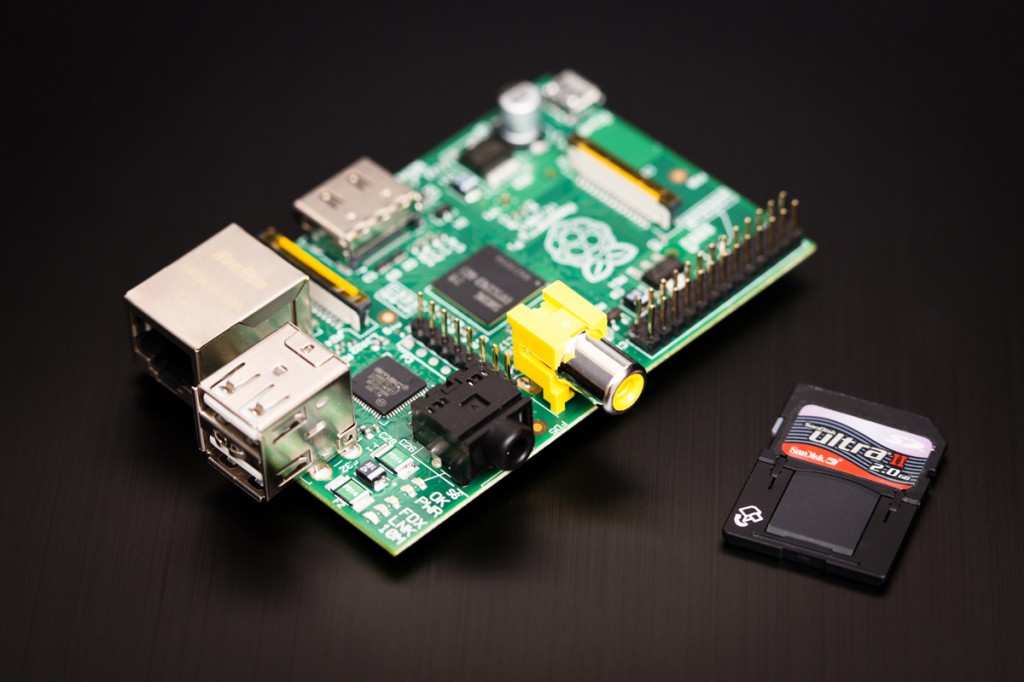
Today I joined the latest craze sweeping the Internet. No, not Vadering (although I should look into how that could be done with the boys). I bought two brand new computers today. It cost me a total of $70 + shipping. Well, actually, I didn't buy the whole computer, I just bought the motherboard, which has the processor, RAM, video card (with HDMI and analog RCA out), audio card, SD card reader, onboard NIC and 2x USB ports. It's all built into a special little PCB (printed circuit board) that takes advantage of SOC (system on a chip: basically the main guts of a computer all on one chip, similar to most tablets and phones).
 It's called Raspberry Pi and is produced by a non-profit organization that designed them to be used in developing countries for education. Since it's a charity, they designed the board to be extremely cheap and can sell it for $35! They're currently being distributed through three reseller partners officially. Each reseller also sells in bulk to other companies so you can find them elsewhere. The main drive for resellers is the accessories that go a long with it (more about this later). RS (only in Europe), Allied Electronics, and Element14 (through Newark) are the official resellers. For more information, check out the video below or read this article.
I ordered two of them today because for a long time both model A and model B were out of stock everywhere. My dad reminded me last night that they were back in stock so I got one for him and one for me this morning. Here's a good video to introduce what's really behind it.
It should be here within a few days. All that actually comes in the box is the board, no case, no cables, no nothing. So, I'll go dumpster diving into my crates of extra parts in the garage for a 700mA USB power supply (I wonder if the dual USB plug for my portable hard drive would allow this to be powered from my USB hub...), HDMI to VGA converter so I can plug it into my desk monitor, a USB keyboard and a USB mouse (maybe I'll use my Bluetooth dongle and the Logitech diNovo Mini keyboard...), and an SD card. I think I'll start by running Rasbian Wheezy, just to see how well it performs normal desktop tasks. After that I'm going to use it as a test bed for XBMC with RaspBMC to potentially replace my current Windows Media Center dependent installation.
Anyway, I'll try to post my progress as things go along. Eventually, I'll be looking into putting this thing into a case and see what happens. Here are some of the cases I'm looking at


I might even consider making a competitor to the iMac:
 versus
I ordered two of them today because for a long time both model A and model B were out of stock everywhere. My dad reminded me last night that they were back in stock so I got one for him and one for me this morning. Here's a good video to introduce what's really behind it.
It should be here within a few days. All that actually comes in the box is the board, no case, no cables, no nothing. So, I'll go dumpster diving into my crates of extra parts in the garage for a 700mA USB power supply (I wonder if the dual USB plug for my portable hard drive would allow this to be powered from my USB hub...), HDMI to VGA converter so I can plug it into my desk monitor, a USB keyboard and a USB mouse (maybe I'll use my Bluetooth dongle and the Logitech diNovo Mini keyboard...), and an SD card. I think I'll start by running Rasbian Wheezy, just to see how well it performs normal desktop tasks. After that I'm going to use it as a test bed for XBMC with RaspBMC to potentially replace my current Windows Media Center dependent installation.
Anyway, I'll try to post my progress as things go along. Eventually, I'll be looking into putting this thing into a case and see what happens. Here are some of the cases I'm looking at
I might even consider making a competitor to the iMac:
versus Wednesday, March 6, 2013
Page Retirement Methods
Continuing my effort to document the various ways I've used the ODBC connector for the NetQoS products, here's my next query and controls I've built and that I use in production. Today's query comes from a need to notify users that a particular page is being retired. Instead of immediately deleting a page and having to deal with confused users, I used the browser view to display a banner telling the users that they have X days until the page is retired. This could be done manually by creating a different static HTML page display a different date for each page, but I wanted a way to make it easy.
First of all, I didn't want to have to rebuilt the banner for each page that is going to be retired. So, I needed a way that each instance of the banner have a way to store an individual expiration date. I also wanted a way for users who don't want their precious pages deleted to notify me. A simple email would have done, but that would have almost always involved an immediate ping back to the user asking which page. So, the banner needs a way to start an email and automatically put the URL to the page.
The implementation is pretty easy.
Now that you've marked a couple pages to be retired, you can use an ODBC connection to display all those pages. Here's the SelectCommand and OdbcConnection String to put in the configuration.xml:
To create the view, run the following SQL commands against the NPC server:
First of all, I didn't want to have to rebuilt the banner for each page that is going to be retired. So, I needed a way that each instance of the banner have a way to store an individual expiration date. I also wanted a way for users who don't want their precious pages deleted to notify me. A simple email would have done, but that would have almost always involved an immediate ping back to the user asking which page. So, the banner needs a way to start an email and automatically put the URL to the page.
The implementation is pretty easy.
- First of all, get this first section of code, update 'email@company.com' to your email address on the fourth to last line and save it as pageexpiring.html in your custom content directory. Download a copy of the code here.
- Then put a browser view on the page to be retired and set the URL to point to pageexpiring.html in your custom content directory and save the view. When the page refreshes, you should see a message saying that the page has been scheduled to be retired on an unknown date.
- To add a specific date, edit the browser view and append ?expirationdate=3/31/2013 to the URL (replacing 3/31/2013 with the page retirement date).
- Repeat steps 2 and 3 for any remaining pages to be retired.
Now that you've marked a couple pages to be retired, you can use an ODBC connection to display all those pages. Here's the SelectCommand and OdbcConnection String to put in the configuration.xml:
To create the view, run the following SQL commands against the NPC server:
Thursday, February 14, 2013
NetVoyant Device Inventory through ODBC
Continuing my effort to document the various ways I've used the ODBC connector for the NetQoS products, here's my next query and controls I've built and that I use in production. Today's query comes from a need to export a list of all devices polled by NetVoyant to CSV. This can usually be done by going to Inventory >> Devices and exporting to CSV from there. However, that control has a limit of 5000 devices and we're monitoring more than that. Luckily ODBC doesn't have that limitation. Here's the SelectCommand and OdbcConnection String to put in the configuration.xml:
To create the view, run the following SQL commands against the NPC server:
To create the view, run the following SQL commands against the NPC server:
Wednesday, February 13, 2013
The Law of Averages
The Law of Averages is not actually a law, but really just a lay term for some mathematical principles either completely unfounded in any mathematical law or borrowed from the Law of Large Numbers. For more information, see this Wikipedia article. However, this post is titled 'The Law of Averages' because I wanted to go into some detail about averaging averages.
In particular, I was asked this question: "If I have a data point for every minute of the data, I also have an average of 15 data points for every 15 minute period of the day, and I wanted to calculate the daily average, it would be better to use the 1 minute data versus the 15 minute averages (aka rollup data). The average of the 15 minute averages would really be an average of averages and is therefore not accurate."
The reality is actually contrary to that thinking. The average of averages of data is exactly the same as the average of the same source data. To illustrate this, let's look at some data.
Below, we have random numbers between 0 and 100 to represent our data. We have one data point for each minute of the day. Every 15 minutes, an average is calculated. For example, at 0:30 an average is calculated averaging the points from 0:30-0:44.
Here's the funny part. The question that was posited essentially asked if the average of the 1 minute data would be more accurate than the average of the 15 minute averages. Here are the results:
Average of all the 1 minute data points: 49.76319444
Average of all the 15 minute averages: 49.76319444
They're exactly the same! The reason for this comes from the associative property of addition. Think about the formula for an average:
x̄ = (a1+a2+a3+...+an)/n
If you had multiple sets (i.e. 15 minute averages):
x̄ = {(a1+a2+a3+...+an)/na + (b1+b2+b3+...+bn)/nb + (c1+c2+c3+...+cn)/nc}/3
Since in this case na=nb=nc, then substitue n and factor out:
x̄ = {(a1+a2+a3+...+an) + (b1+b2+b3+...+bn) + (c1+c2+c3+...+cn)}/3n
Associative property of addition:
x̄ = (a1+a2+a3+...+an+b1+b2+b3+...+bn+c1+c2+c3+...+cn)/3n
Since in this case 3n = n + n + n and na=nb=nc=n, then substitue for n:
x̄ = (a1+a2+a3+...+an+b1+b2+b3+...+bn+c1+c2+c3+...+cn)/(n + n + n)
x̄ = (a1+a2+a3+...+an+b1+b2+b3+...+bn+c1+c2+c3+...+cn)/(na + nb + nc)
Knowing that na + nb + nc is actually the total number of original points gets us back to the original equation for calculating the average of the 1 minute data. So the average of all the data points is the same as the average of evenly spaced averages of all the data points. If you're wondering if this works, go ahead and mock it up in Excel. I did.
In particular, I was asked this question: "If I have a data point for every minute of the data, I also have an average of 15 data points for every 15 minute period of the day, and I wanted to calculate the daily average, it would be better to use the 1 minute data versus the 15 minute averages (aka rollup data). The average of the 15 minute averages would really be an average of averages and is therefore not accurate."
The reality is actually contrary to that thinking. The average of averages of data is exactly the same as the average of the same source data. To illustrate this, let's look at some data.
Below, we have random numbers between 0 and 100 to represent our data. We have one data point for each minute of the day. Every 15 minutes, an average is calculated. For example, at 0:30 an average is calculated averaging the points from 0:30-0:44.
| Time | 1 Minute Data | 15 Minute Average |
| 0:00 | 37 | 51.6666666666667 |
| 0:01 | 74 | |
| 0:02 | 49 | |
| 0:03 | 21 | |
| 0:04 | 59 | |
| 0:05 | 15 | |
| 0:06 | 32 | |
| 0:07 | 69 | |
| 0:08 | 40 | |
| 0:09 | 26 | |
| 0:10 | 87 | |
| 0:11 | 38 | |
| 0:12 | 96 | |
| 0:13 | 79 | |
| 0:14 | 53 | |
| 0:15 | 60 | 25.8 |
| 0:16 | 35 | |
| 0:17 | 7 | |
| 0:18 | 24 | |
| 0:19 | 46 | |
| 0:20 | 3 | |
| 0:21 | 22 | |
| 0:22 | 1 | |
| 0:23 | 39 | |
| 0:24 | 9 | |
| 0:25 | 34 | |
| 0:26 | 0 | |
| 0:27 | 42 | |
| 0:28 | 34 | |
| 0:29 | 31 | |
| 0:30 | 4 | 33.8 |
| 0:31 | 5 | |
| 0:32 | 81 | |
| 0:33 | 36 | |
| 0:34 | 35 | |
| 0:35 | 9 | |
| 0:36 | 36 | |
| 0:37 | 41 | |
| 0:38 | 76 | |
| 0:39 | 93 | |
| 0:40 | 21 | |
| 0:41 | 12 | |
| 0:42 | 10 | |
| 0:43 | 21 | |
| 0:44 | 27 | |
| 0:45 | 5 | 48.8 |
| 0:46 | 42 | |
| 0:47 | 83 | |
| 0:48 | 48 | |
| 0:49 | 18 | |
| 0:50 | 79 | |
| 0:51 | 24 | |
| 0:52 | 78 | |
| 0:53 | 19 | |
| 0:54 | 5 | |
| 0:55 | 52 | |
| 0:56 | 100 | |
| 0:57 | 39 | |
| 0:58 | 70 | |
| 0:59 | 70 | |
| 1:00 | 14 | 44.0666666666667 |
| 1:01 | 45 | |
| 1:02 | 82 | |
| 1:03 | 34 | |
| 1:04 | 74 | |
| 1:05 | 90 | |
| 1:06 | 33 | |
| 1:07 | 10 | |
| 1:08 | 43 | |
| 1:09 | 24 | |
| 1:10 | 96 | |
| 1:11 | 12 | |
| 1:12 | 17 | |
| 1:13 | 62 | |
| 1:14 | 25 | |
| 1:15 | 96 | 54.7333333333333 |
| 1:16 | 19 | |
| 1:17 | 91 | |
| 1:18 | 58 | |
| 1:19 | 76 | |
| 1:20 | 24 | |
| 1:21 | 86 | |
| 1:22 | 35 | |
| 1:23 | 48 | |
| 1:24 | 31 | |
| 1:25 | 67 | |
| 1:26 | 72 | |
| 1:27 | 9 | |
| 1:28 | 45 | |
| 1:29 | 64 | |
| 1:30 | 79 | 40.4 |
| 1:31 | 68 | |
| 1:32 | 0 | |
| 1:33 | 10 | |
| 1:34 | 30 | |
| 1:35 | 23 | |
| 1:36 | 65 | |
| 1:37 | 74 | |
| 1:38 | 53 | |
| 1:39 | 78 | |
| 1:40 | 4 | |
| 1:41 | 3 | |
| 1:42 | 38 | |
| 1:43 | 78 | |
| 1:44 | 3 | |
| 1:45 | 91 | 47.6 |
| 1:46 | 85 | |
| 1:47 | 44 | |
| 1:48 | 4 | |
| 1:49 | 6 | |
| 1:50 | 13 | |
| 1:51 | 39 | |
| 1:52 | 93 | |
| 1:53 | 52 | |
| 1:54 | 35 | |
| 1:55 | 49 | |
| 1:56 | 69 | |
| 1:57 | 67 | |
| 1:58 | 64 | |
| 1:59 | 3 | |
| 2:00 | 11 | 56.8666666666667 |
| 2:01 | 72 | |
| 2:02 | 54 | |
| 2:03 | 45 | |
| 2:04 | 16 | |
| 2:05 | 17 | |
| 2:06 | 75 | |
| 2:07 | 96 | |
| 2:08 | 96 | |
| 2:09 | 62 | |
| 2:10 | 80 | |
| 2:11 | 55 | |
| 2:12 | 96 | |
| 2:13 | 34 | |
| 2:14 | 44 | |
| 2:15 | 73 | 46.6666666666667 |
| 2:16 | 57 | |
| 2:17 | 21 | |
| 2:18 | 61 | |
| 2:19 | 28 | |
| 2:20 | 11 | |
| 2:21 | 16 | |
| 2:22 | 1 | |
| 2:23 | 86 | |
| 2:24 | 23 | |
| 2:25 | 64 | |
| 2:26 | 89 | |
| 2:27 | 46 | |
| 2:28 | 38 | |
| 2:29 | 86 | |
| 2:30 | 42 | 45.8 |
| 2:31 | 15 | |
| 2:32 | 7 | |
| 2:33 | 3 | |
| 2:34 | 40 | |
| 2:35 | 41 | |
| 2:36 | 8 | |
| 2:37 | 66 | |
| 2:38 | 1 | |
| 2:39 | 85 | |
| 2:40 | 59 | |
| 2:41 | 89 | |
| 2:42 | 94 | |
| 2:43 | 42 | |
| 2:44 | 95 | |
| 2:45 | 64 | 57.6 |
| 2:46 | 58 | |
| 2:47 | 6 | |
| 2:48 | 14 | |
| 2:49 | 17 | |
| 2:50 | 100 | |
| 2:51 | 85 | |
| 2:52 | 72 | |
| 2:53 | 93 | |
| 2:54 | 58 | |
| 2:55 | 100 | |
| 2:56 | 32 | |
| 2:57 | 53 | |
| 2:58 | 36 | |
| 2:59 | 76 | |
| 3:00 | 4 | 38.7333333333333 |
| 3:01 | 19 | |
| 3:02 | 32 | |
| 3:03 | 14 | |
| 3:04 | 84 | |
| 3:05 | 26 | |
| 3:06 | 17 | |
| 3:07 | 65 | |
| 3:08 | 20 | |
| 3:09 | 15 | |
| 3:10 | 26 | |
| 3:11 | 52 | |
| 3:12 | 79 | |
| 3:13 | 31 | |
| 3:14 | 97 | |
| 3:15 | 8 | 55.6666666666667 |
| 3:16 | 47 | |
| 3:17 | 87 | |
| 3:18 | 66 | |
| 3:19 | 23 | |
| 3:20 | 88 | |
| 3:21 | 28 | |
| 3:22 | 53 | |
| 3:23 | 87 | |
| 3:24 | 66 | |
| 3:25 | 32 | |
| 3:26 | 71 | |
| 3:27 | 87 | |
| 3:28 | 10 | |
| 3:29 | 82 | |
| 3:30 | 84 | 54.9333333333333 |
| 3:31 | 81 | |
| 3:32 | 54 | |
| 3:33 | 88 | |
| 3:34 | 77 | |
| 3:35 | 98 | |
| 3:36 | 2 | |
| 3:37 | 15 | |
| 3:38 | 92 | |
| 3:39 | 72 | |
| 3:40 | 16 | |
| 3:41 | 45 | |
| 3:42 | 4 | |
| 3:43 | 60 | |
| 3:44 | 36 | |
| 3:45 | 84 | 63.4666666666667 |
| 3:46 | 97 | |
| 3:47 | 87 | |
| 3:48 | 29 | |
| 3:49 | 53 | |
| 3:50 | 11 | |
| 3:51 | 84 | |
| 3:52 | 83 | |
| 3:53 | 76 | |
| 3:54 | 64 | |
| 3:55 | 50 | |
| 3:56 | 36 | |
| 3:57 | 83 | |
| 3:58 | 38 | |
| 3:59 | 77 | |
| 4:00 | 3 | 64.1333333333333 |
| 4:01 | 79 | |
| 4:02 | 90 | |
| 4:03 | 91 | |
| 4:04 | 46 | |
| 4:05 | 53 | |
| 4:06 | 26 | |
| 4:07 | 77 | |
| 4:08 | 46 | |
| 4:09 | 62 | |
| 4:10 | 60 | |
| 4:11 | 93 | |
| 4:12 | 78 | |
| 4:13 | 92 | |
| 4:14 | 66 | |
| 4:15 | 35 | 37.1333333333333 |
| 4:16 | 81 | |
| 4:17 | 42 | |
| 4:18 | 50 | |
| 4:19 | 14 | |
| 4:20 | 26 | |
| 4:21 | 72 | |
| 4:22 | 4 | |
| 4:23 | 15 | |
| 4:24 | 65 | |
| 4:25 | 14 | |
| 4:26 | 9 | |
| 4:27 | 10 | |
| 4:28 | 38 | |
| 4:29 | 82 | |
| 4:30 | 14 | 51 |
| 4:31 | 48 | |
| 4:32 | 62 | |
| 4:33 | 36 | |
| 4:34 | 89 | |
| 4:35 | 3 | |
| 4:36 | 53 | |
| 4:37 | 58 | |
| 4:38 | 86 | |
| 4:39 | 71 | |
| 4:40 | 49 | |
| 4:41 | 67 | |
| 4:42 | 20 | |
| 4:43 | 96 | |
| 4:44 | 13 | |
| 4:45 | 0 | 47.3333333333333 |
| 4:46 | 91 | |
| 4:47 | 64 | |
| 4:48 | 28 | |
| 4:49 | 96 | |
| 4:50 | 23 | |
| 4:51 | 37 | |
| 4:52 | 37 | |
| 4:53 | 77 | |
| 4:54 | 15 | |
| 4:55 | 13 | |
| 4:56 | 98 | |
| 4:57 | 7 | |
| 4:58 | 58 | |
| 4:59 | 66 | |
| 5:00 | 48 | 48.6 |
| 5:01 | 22 | |
| 5:02 | 5 | |
| 5:03 | 76 | |
| 5:04 | 96 | |
| 5:05 | 5 | |
| 5:06 | 10 | |
| 5:07 | 3 | |
| 5:08 | 34 | |
| 5:09 | 56 | |
| 5:10 | 82 | |
| 5:11 | 96 | |
| 5:12 | 58 | |
| 5:13 | 80 | |
| 5:14 | 58 | |
| 5:15 | 48 | 48.1333333333333 |
| 5:16 | 30 | |
| 5:17 | 50 | |
| 5:18 | 71 | |
| 5:19 | 12 | |
| 5:20 | 12 | |
| 5:21 | 98 | |
| 5:22 | 24 | |
| 5:23 | 41 | |
| 5:24 | 21 | |
| 5:25 | 66 | |
| 5:26 | 24 | |
| 5:27 | 99 | |
| 5:28 | 73 | |
| 5:29 | 53 | |
| 5:30 | 8 | 37.3333333333333 |
| 5:31 | 67 | |
| 5:32 | 17 | |
| 5:33 | 0 | |
| 5:34 | 0 | |
| 5:35 | 37 | |
| 5:36 | 51 | |
| 5:37 | 33 | |
| 5:38 | 28 | |
| 5:39 | 58 | |
| 5:40 | 3 | |
| 5:41 | 74 | |
| 5:42 | 79 | |
| 5:43 | 90 | |
| 5:44 | 15 | |
| 5:45 | 56 | 55.7333333333333 |
| 5:46 | 82 | |
| 5:47 | 66 | |
| 5:48 | 64 | |
| 5:49 | 69 | |
| 5:50 | 94 | |
| 5:51 | 81 | |
| 5:52 | 23 | |
| 5:53 | 22 | |
| 5:54 | 41 | |
| 5:55 | 16 | |
| 5:56 | 89 | |
| 5:57 | 47 | |
| 5:58 | 74 | |
| 5:59 | 12 | |
| 6:00 | 70 | 49.2666666666667 |
| 6:01 | 72 | |
| 6:02 | 76 | |
| 6:03 | 28 | |
| 6:04 | 62 | |
| 6:05 | 28 | |
| 6:06 | 46 | |
| 6:07 | 62 | |
| 6:08 | 61 | |
| 6:09 | 34 | |
| 6:10 | 52 | |
| 6:11 | 69 | |
| 6:12 | 12 | |
| 6:13 | 37 | |
| 6:14 | 30 | |
| 6:15 | 79 | 51.8666666666667 |
| 6:16 | 35 | |
| 6:17 | 74 | |
| 6:18 | 71 | |
| 6:19 | 12 | |
| 6:20 | 52 | |
| 6:21 | 72 | |
| 6:22 | 6 | |
| 6:23 | 89 | |
| 6:24 | 16 | |
| 6:25 | 17 | |
| 6:26 | 30 | |
| 6:27 | 64 | |
| 6:28 | 76 | |
| 6:29 | 85 | |
| 6:30 | 47 | 42.8666666666667 |
| 6:31 | 44 | |
| 6:32 | 46 | |
| 6:33 | 46 | |
| 6:34 | 2 | |
| 6:35 | 83 | |
| 6:36 | 12 | |
| 6:37 | 24 | |
| 6:38 | 47 | |
| 6:39 | 94 | |
| 6:40 | 32 | |
| 6:41 | 70 | |
| 6:42 | 70 | |
| 6:43 | 24 | |
| 6:44 | 2 | |
| 6:45 | 77 | 54.2 |
| 6:46 | 1 | |
| 6:47 | 27 | |
| 6:48 | 47 | |
| 6:49 | 18 | |
| 6:50 | 75 | |
| 6:51 | 46 | |
| 6:52 | 83 | |
| 6:53 | 58 | |
| 6:54 | 24 | |
| 6:55 | 58 | |
| 6:56 | 81 | |
| 6:57 | 65 | |
| 6:58 | 57 | |
| 6:59 | 96 | |
| 7:00 | 34 | 66.8666666666667 |
| 7:01 | 99 | |
| 7:02 | 79 | |
| 7:03 | 75 | |
| 7:04 | 89 | |
| 7:05 | 92 | |
| 7:06 | 63 | |
| 7:07 | 47 | |
| 7:08 | 49 | |
| 7:09 | 93 | |
| 7:10 | 45 | |
| 7:11 | 40 | |
| 7:12 | 97 | |
| 7:13 | 41 | |
| 7:14 | 60 | |
| 7:15 | 56 | 52.0666666666667 |
| 7:16 | 71 | |
| 7:17 | 92 | |
| 7:18 | 31 | |
| 7:19 | 68 | |
| 7:20 | 1 | |
| 7:21 | 3 | |
| 7:22 | 64 | |
| 7:23 | 21 | |
| 7:24 | 7 | |
| 7:25 | 82 | |
| 7:26 | 8 | |
| 7:27 | 99 | |
| 7:28 | 96 | |
| 7:29 | 82 | |
| 7:30 | 97 | 51.4 |
| 7:31 | 5 | |
| 7:32 | 1 | |
| 7:33 | 82 | |
| 7:34 | 67 | |
| 7:35 | 30 | |
| 7:36 | 29 | |
| 7:37 | 89 | |
| 7:38 | 53 | |
| 7:39 | 80 | |
| 7:40 | 14 | |
| 7:41 | 88 | |
| 7:42 | 73 | |
| 7:43 | 36 | |
| 7:44 | 27 | |
| 7:45 | 53 | 47.4666666666667 |
| 7:46 | 47 | |
| 7:47 | 55 | |
| 7:48 | 4 | |
| 7:49 | 46 | |
| 7:50 | 65 | |
| 7:51 | 47 | |
| 7:52 | 21 | |
| 7:53 | 25 | |
| 7:54 | 51 | |
| 7:55 | 87 | |
| 7:56 | 24 | |
| 7:57 | 46 | |
| 7:58 | 75 | |
| 7:59 | 66 | |
| 8:00 | 63 | 41.5333333333333 |
| 8:01 | 46 | |
| 8:02 | 69 | |
| 8:03 | 58 | |
| 8:04 | 14 | |
| 8:05 | 21 | |
| 8:06 | 83 | |
| 8:07 | 75 | |
| 8:08 | 23 | |
| 8:09 | 12 | |
| 8:10 | 60 | |
| 8:11 | 63 | |
| 8:12 | 6 | |
| 8:13 | 9 | |
| 8:14 | 21 | |
| 8:15 | 53 | 40.6 |
| 8:16 | 42 | |
| 8:17 | 22 | |
| 8:18 | 0 | |
| 8:19 | 65 | |
| 8:20 | 6 | |
| 8:21 | 66 | |
| 8:22 | 16 | |
| 8:23 | 85 | |
| 8:24 | 8 | |
| 8:25 | 78 | |
| 8:26 | 44 | |
| 8:27 | 86 | |
| 8:28 | 30 | |
| 8:29 | 8 | |
| 8:30 | 98 | 68.3333333333333 |
| 8:31 | 81 | |
| 8:32 | 93 | |
| 8:33 | 66 | |
| 8:34 | 60 | |
| 8:35 | 27 | |
| 8:36 | 84 | |
| 8:37 | 62 | |
| 8:38 | 81 | |
| 8:39 | 76 | |
| 8:40 | 94 | |
| 8:41 | 19 | |
| 8:42 | 60 | |
| 8:43 | 38 | |
| 8:44 | 86 | |
| 8:45 | 92 | 47.7333333333333 |
| 8:46 | 39 | |
| 8:47 | 18 | |
| 8:48 | 49 | |
| 8:49 | 36 | |
| 8:50 | 57 | |
| 8:51 | 59 | |
| 8:52 | 84 | |
| 8:53 | 8 | |
| 8:54 | 36 | |
| 8:55 | 14 | |
| 8:56 | 48 | |
| 8:57 | 51 | |
| 8:58 | 67 | |
| 8:59 | 58 | |
| 9:00 | 73 | 44.7333333333333 |
| 9:01 | 90 | |
| 9:02 | 59 | |
| 9:03 | 2 | |
| 9:04 | 1 | |
| 9:05 | 2 | |
| 9:06 | 33 | |
| 9:07 | 51 | |
| 9:08 | 33 | |
| 9:09 | 81 | |
| 9:10 | 2 | |
| 9:11 | 93 | |
| 9:12 | 79 | |
| 9:13 | 18 | |
| 9:14 | 54 | |
| 9:15 | 87 | 48.8666666666667 |
| 9:16 | 75 | |
| 9:17 | 33 | |
| 9:18 | 19 | |
| 9:19 | 24 | |
| 9:20 | 14 | |
| 9:21 | 45 | |
| 9:22 | 13 | |
| 9:23 | 93 | |
| 9:24 | 54 | |
| 9:25 | 69 | |
| 9:26 | 12 | |
| 9:27 | 2 | |
| 9:28 | 99 | |
| 9:29 | 94 | |
| 9:30 | 42 | 44.4666666666667 |
| 9:31 | 70 | |
| 9:32 | 83 | |
| 9:33 | 20 | |
| 9:34 | 66 | |
| 9:35 | 10 | |
| 9:36 | 35 | |
| 9:37 | 74 | |
| 9:38 | 18 | |
| 9:39 | 35 | |
| 9:40 | 7 | |
| 9:41 | 64 | |
| 9:42 | 67 | |
| 9:43 | 55 | |
| 9:44 | 21 | |
| 9:45 | 48 | 53.4 |
| 9:46 | 91 | |
| 9:47 | 88 | |
| 9:48 | 3 | |
| 9:49 | 11 | |
| 9:50 | 45 | |
| 9:51 | 8 | |
| 9:52 | 20 | |
| 9:53 | 96 | |
| 9:54 | 17 | |
| 9:55 | 76 | |
| 9:56 | 78 | |
| 9:57 | 54 | |
| 9:58 | 99 | |
| 9:59 | 67 | |
| 10:00 | 18 | 53.5333333333333 |
| 10:01 | 52 | |
| 10:02 | 33 | |
| 10:03 | 19 | |
| 10:04 | 65 | |
| 10:05 | 88 | |
| 10:06 | 56 | |
| 10:07 | 99 | |
| 10:08 | 18 | |
| 10:09 | 98 | |
| 10:10 | 50 | |
| 10:11 | 46 | |
| 10:12 | 42 | |
| 10:13 | 53 | |
| 10:14 | 66 | |
| 10:15 | 61 | 58.5333333333333 |
| 10:16 | 84 | |
| 10:17 | 66 | |
| 10:18 | 44 | |
| 10:19 | 43 | |
| 10:20 | 8 | |
| 10:21 | 26 | |
| 10:22 | 77 | |
| 10:23 | 55 | |
| 10:24 | 85 | |
| 10:25 | 6 | |
| 10:26 | 91 | |
| 10:27 | 66 | |
| 10:28 | 66 | |
| 10:29 | 100 | |
| 10:30 | 74 | 46.3333333333333 |
| 10:31 | 70 | |
| 10:32 | 10 | |
| 10:33 | 72 | |
| 10:34 | 35 | |
| 10:35 | 19 | |
| 10:36 | 86 | |
| 10:37 | 72 | |
| 10:38 | 7 | |
| 10:39 | 31 | |
| 10:40 | 95 | |
| 10:41 | 35 | |
| 10:42 | 46 | |
| 10:43 | 2 | |
| 10:44 | 41 | |
| 10:45 | 45 | 46.3333333333333 |
| 10:46 | 85 | |
| 10:47 | 3 | |
| 10:48 | 11 | |
| 10:49 | 48 | |
| 10:50 | 90 | |
| 10:51 | 59 | |
| 10:52 | 40 | |
| 10:53 | 26 | |
| 10:54 | 9 | |
| 10:55 | 94 | |
| 10:56 | 7 | |
| 10:57 | 70 | |
| 10:58 | 31 | |
| 10:59 | 77 | |
| 11:00 | 67 | 47 |
| 11:01 | 78 | |
| 11:02 | 59 | |
| 11:03 | 0 | |
| 11:04 | 70 | |
| 11:05 | 77 | |
| 11:06 | 71 | |
| 11:07 | 49 | |
| 11:08 | 51 | |
| 11:09 | 63 | |
| 11:10 | 21 | |
| 11:11 | 21 | |
| 11:12 | 50 | |
| 11:13 | 11 | |
| 11:14 | 17 | |
| 11:15 | 4 | 46.9333333333333 |
| 11:16 | 54 | |
| 11:17 | 9 | |
| 11:18 | 49 | |
| 11:19 | 30 | |
| 11:20 | 82 | |
| 11:21 | 41 | |
| 11:22 | 22 | |
| 11:23 | 33 | |
| 11:24 | 29 | |
| 11:25 | 78 | |
| 11:26 | 88 | |
| 11:27 | 37 | |
| 11:28 | 84 | |
| 11:29 | 64 | |
| 11:30 | 23 | 47.4666666666667 |
| 11:31 | 50 | |
| 11:32 | 8 | |
| 11:33 | 50 | |
| 11:34 | 24 | |
| 11:35 | 84 | |
| 11:36 | 53 | |
| 11:37 | 78 | |
| 11:38 | 80 | |
| 11:39 | 2 | |
| 11:40 | 61 | |
| 11:41 | 89 | |
| 11:42 | 77 | |
| 11:43 | 16 | |
| 11:44 | 17 | |
| 11:45 | 19 | 36.2666666666667 |
| 11:46 | 64 | |
| 11:47 | 85 | |
| 11:48 | 9 | |
| 11:49 | 30 | |
| 11:50 | 24 | |
| 11:51 | 5 | |
| 11:52 | 10 | |
| 11:53 | 59 | |
| 11:54 | 7 | |
| 11:55 | 42 | |
| 11:56 | 21 | |
| 11:57 | 69 | |
| 11:58 | 55 | |
| 11:59 | 45 | |
| 12:00 | 37 | 48.0666666666667 |
| 12:01 | 60 | |
| 12:02 | 85 | |
| 12:03 | 44 | |
| 12:04 | 28 | |
| 12:05 | 89 | |
| 12:06 | 35 | |
| 12:07 | 18 | |
| 12:08 | 48 | |
| 12:09 | 64 | |
| 12:10 | 3 | |
| 12:11 | 38 | |
| 12:12 | 96 | |
| 12:13 | 5 | |
| 12:14 | 71 | |
| 12:15 | 71 | 46.4 |
| 12:16 | 93 | |
| 12:17 | 37 | |
| 12:18 | 7 | |
| 12:19 | 38 | |
| 12:20 | 85 | |
| 12:21 | 28 | |
| 12:22 | 86 | |
| 12:23 | 12 | |
| 12:24 | 65 | |
| 12:25 | 38 | |
| 12:26 | 6 | |
| 12:27 | 66 | |
| 12:28 | 24 | |
| 12:29 | 40 | |
| 12:30 | 26 | 42 |
| 12:31 | 98 | |
| 12:32 | 74 | |
| 12:33 | 13 | |
| 12:34 | 46 | |
| 12:35 | 52 | |
| 12:36 | 39 | |
| 12:37 | 14 | |
| 12:38 | 38 | |
| 12:39 | 25 | |
| 12:40 | 28 | |
| 12:41 | 30 | |
| 12:42 | 44 | |
| 12:43 | 63 | |
| 12:44 | 40 | |
| 12:45 | 96 | 41.0666666666667 |
| 12:46 | 13 | |
| 12:47 | 50 | |
| 12:48 | 8 | |
| 12:49 | 43 | |
| 12:50 | 27 | |
| 12:51 | 38 | |
| 12:52 | 97 | |
| 12:53 | 0 | |
| 12:54 | 11 | |
| 12:55 | 84 | |
| 12:56 | 73 | |
| 12:57 | 11 | |
| 12:58 | 20 | |
| 12:59 | 45 | |
| 13:00 | 39 | 60.1333333333333 |
| 13:01 | 94 | |
| 13:02 | 95 | |
| 13:03 | 82 | |
| 13:04 | 39 | |
| 13:05 | 26 | |
| 13:06 | 80 | |
| 13:07 | 70 | |
| 13:08 | 19 | |
| 13:09 | 79 | |
| 13:10 | 74 | |
| 13:11 | 78 | |
| 13:12 | 16 | |
| 13:13 | 20 | |
| 13:14 | 91 | |
| 13:15 | 58 | 46 |
| 13:16 | 67 | |
| 13:17 | 52 | |
| 13:18 | 55 | |
| 13:19 | 47 | |
| 13:20 | 25 | |
| 13:21 | 8 | |
| 13:22 | 78 | |
| 13:23 | 53 | |
| 13:24 | 55 | |
| 13:25 | 43 | |
| 13:26 | 9 | |
| 13:27 | 28 | |
| 13:28 | 56 | |
| 13:29 | 56 | |
| 13:30 | 26 | 27.7333333333333 |
| 13:31 | 5 | |
| 13:32 | 17 | |
| 13:33 | 2 | |
| 13:34 | 53 | |
| 13:35 | 9 | |
| 13:36 | 5 | |
| 13:37 | 63 | |
| 13:38 | 91 | |
| 13:39 | 46 | |
| 13:40 | 7 | |
| 13:41 | 23 | |
| 13:42 | 25 | |
| 13:43 | 3 | |
| 13:44 | 41 | |
| 13:45 | 94 | 49.0666666666667 |
| 13:46 | 70 | |
| 13:47 | 49 | |
| 13:48 | 60 | |
| 13:49 | 59 | |
| 13:50 | 51 | |
| 13:51 | 71 | |
| 13:52 | 16 | |
| 13:53 | 37 | |
| 13:54 | 31 | |
| 13:55 | 13 | |
| 13:56 | 64 | |
| 13:57 | 76 | |
| 13:58 | 30 | |
| 13:59 | 15 | |
| 14:00 | 0 | 32.5333333333333 |
| 14:01 | 6 | |
| 14:02 | 7 | |
| 14:03 | 13 | |
| 14:04 | 52 | |
| 14:05 | 25 | |
| 14:06 | 53 | |
| 14:07 | 15 | |
| 14:08 | 65 | |
| 14:09 | 70 | |
| 14:10 | 72 | |
| 14:11 | 12 | |
| 14:12 | 23 | |
| 14:13 | 23 | |
| 14:14 | 52 | |
| 14:15 | 87 | 50.9333333333333 |
| 14:16 | 98 | |
| 14:17 | 24 | |
| 14:18 | 60 | |
| 14:19 | 32 | |
| 14:20 | 31 | |
| 14:21 | 10 | |
| 14:22 | 63 | |
| 14:23 | 28 | |
| 14:24 | 20 | |
| 14:25 | 42 | |
| 14:26 | 90 | |
| 14:27 | 43 | |
| 14:28 | 81 | |
| 14:29 | 55 | |
| 14:30 | 60 | 53.7333333333333 |
| 14:31 | 45 | |
| 14:32 | 98 | |
| 14:33 | 96 | |
| 14:34 | 11 | |
| 14:35 | 14 | |
| 14:36 | 3 | |
| 14:37 | 97 | |
| 14:38 | 63 | |
| 14:39 | 29 | |
| 14:40 | 23 | |
| 14:41 | 96 | |
| 14:42 | 35 | |
| 14:43 | 89 | |
| 14:44 | 47 | |
| 14:45 | 67 | 58.4666666666667 |
| 14:46 | 41 | |
| 14:47 | 66 | |
| 14:48 | 70 | |
| 14:49 | 98 | |
| 14:50 | 47 | |
| 14:51 | 37 | |
| 14:52 | 68 | |
| 14:53 | 61 | |
| 14:54 | 16 | |
| 14:55 | 70 | |
| 14:56 | 19 | |
| 14:57 | 46 | |
| 14:58 | 100 | |
| 14:59 | 71 | |
| 15:00 | 97 | 56.7333333333333 |
| 15:01 | 65 | |
| 15:02 | 99 | |
| 15:03 | 60 | |
| 15:04 | 54 | |
| 15:05 | 3 | |
| 15:06 | 60 | |
| 15:07 | 79 | |
| 15:08 | 30 | |
| 15:09 | 50 | |
| 15:10 | 37 | |
| 15:11 | 54 | |
| 15:12 | 51 | |
| 15:13 | 63 | |
| 15:14 | 49 | |
| 15:15 | 27 | 43.0666666666667 |
| 15:16 | 10 | |
| 15:17 | 77 | |
| 15:18 | 82 | |
| 15:19 | 15 | |
| 15:20 | 55 | |
| 15:21 | 68 | |
| 15:22 | 74 | |
| 15:23 | 11 | |
| 15:24 | 0 | |
| 15:25 | 72 | |
| 15:26 | 49 | |
| 15:27 | 62 | |
| 15:28 | 41 | |
| 15:29 | 3 | |
| 15:30 | 54 | 64.8666666666667 |
| 15:31 | 86 | |
| 15:32 | 95 | |
| 15:33 | 31 | |
| 15:34 | 45 | |
| 15:35 | 71 | |
| 15:36 | 100 | |
| 15:37 | 59 | |
| 15:38 | 43 | |
| 15:39 | 15 | |
| 15:40 | 88 | |
| 15:41 | 3 | |
| 15:42 | 97 | |
| 15:43 | 88 | |
| 15:44 | 98 | |
| 15:45 | 76 | 49.7333333333333 |
| 15:46 | 17 | |
| 15:47 | 82 | |
| 15:48 | 34 | |
| 15:49 | 64 | |
| 15:50 | 85 | |
| 15:51 | 52 | |
| 15:52 | 29 | |
| 15:53 | 60 | |
| 15:54 | 76 | |
| 15:55 | 16 | |
| 15:56 | 12 | |
| 15:57 | 64 | |
| 15:58 | 52 | |
| 15:59 | 27 | |
| 16:00 | 84 | 42.8 |
| 16:01 | 10 | |
| 16:02 | 11 | |
| 16:03 | 13 | |
| 16:04 | 99 | |
| 16:05 | 29 | |
| 16:06 | 64 | |
| 16:07 | 29 | |
| 16:08 | 20 | |
| 16:09 | 64 | |
| 16:10 | 36 | |
| 16:11 | 14 | |
| 16:12 | 38 | |
| 16:13 | 69 | |
| 16:14 | 62 | |
| 16:15 | 96 | 52.0666666666667 |
| 16:16 | 39 | |
| 16:17 | 10 | |
| 16:18 | 80 | |
| 16:19 | 88 | |
| 16:20 | 14 | |
| 16:21 | 2 | |
| 16:22 | 4 | |
| 16:23 | 54 | |
| 16:24 | 25 | |
| 16:25 | 78 | |
| 16:26 | 88 | |
| 16:27 | 99 | |
| 16:28 | 89 | |
| 16:29 | 15 | |
| 16:30 | 73 | 56 |
| 16:31 | 68 | |
| 16:32 | 29 | |
| 16:33 | 43 | |
| 16:34 | 26 | |
| 16:35 | 54 | |
| 16:36 | 13 | |
| 16:37 | 100 | |
| 16:38 | 89 | |
| 16:39 | 33 | |
| 16:40 | 48 | |
| 16:41 | 35 | |
| 16:42 | 92 | |
| 16:43 | 56 | |
| 16:44 | 81 | |
| 16:45 | 30 | 50.1333333333333 |
| 16:46 | 99 | |
| 16:47 | 4 | |
| 16:48 | 100 | |
| 16:49 | 5 | |
| 16:50 | 10 | |
| 16:51 | 37 | |
| 16:52 | 12 | |
| 16:53 | 92 | |
| 16:54 | 99 | |
| 16:55 | 95 | |
| 16:56 | 69 | |
| 16:57 | 20 | |
| 16:58 | 52 | |
| 16:59 | 28 | |
| 17:00 | 45 | 44.3333333333333 |
| 17:01 | 27 | |
| 17:02 | 20 | |
| 17:03 | 35 | |
| 17:04 | 57 | |
| 17:05 | 88 | |
| 17:06 | 91 | |
| 17:07 | 7 | |
| 17:08 | 66 | |
| 17:09 | 41 | |
| 17:10 | 20 | |
| 17:11 | 32 | |
| 17:12 | 77 | |
| 17:13 | 8 | |
| 17:14 | 51 | |
| 17:15 | 38 | 53.6 |
| 17:16 | 36 | |
| 17:17 | 39 | |
| 17:18 | 40 | |
| 17:19 | 15 | |
| 17:20 | 91 | |
| 17:21 | 45 | |
| 17:22 | 37 | |
| 17:23 | 99 | |
| 17:24 | 98 | |
| 17:25 | 54 | |
| 17:26 | 64 | |
| 17:27 | 97 | |
| 17:28 | 48 | |
| 17:29 | 3 | |
| 17:30 | 55 | 50.6 |
| 17:31 | 33 | |
| 17:32 | 71 | |
| 17:33 | 40 | |
| 17:34 | 65 | |
| 17:35 | 80 | |
| 17:36 | 46 | |
| 17:37 | 57 | |
| 17:38 | 43 | |
| 17:39 | 3 | |
| 17:40 | 70 | |
| 17:41 | 30 | |
| 17:42 | 73 | |
| 17:43 | 63 | |
| 17:44 | 30 | |
| 17:45 | 79 | 67.4 |
| 17:46 | 67 | |
| 17:47 | 49 | |
| 17:48 | 75 | |
| 17:49 | 98 | |
| 17:50 | 78 | |
| 17:51 | 83 | |
| 17:52 | 83 | |
| 17:53 | 54 | |
| 17:54 | 77 | |
| 17:55 | 46 | |
| 17:56 | 52 | |
| 17:57 | 66 | |
| 17:58 | 64 | |
| 17:59 | 40 | |
| 18:00 | 95 | 58.8666666666667 |
| 18:01 | 100 | |
| 18:02 | 83 | |
| 18:03 | 61 | |
| 18:04 | 9 | |
| 18:05 | 11 | |
| 18:06 | 35 | |
| 18:07 | 40 | |
| 18:08 | 75 | |
| 18:09 | 80 | |
| 18:10 | 14 | |
| 18:11 | 82 | |
| 18:12 | 37 | |
| 18:13 | 72 | |
| 18:14 | 89 | |
| 18:15 | 48 | 45.6666666666667 |
| 18:16 | 40 | |
| 18:17 | 90 | |
| 18:18 | 27 | |
| 18:19 | 10 | |
| 18:20 | 65 | |
| 18:21 | 52 | |
| 18:22 | 4 | |
| 18:23 | 29 | |
| 18:24 | 23 | |
| 18:25 | 29 | |
| 18:26 | 90 | |
| 18:27 | 92 | |
| 18:28 | 1 | |
| 18:29 | 85 | |
| 18:30 | 62 | 63.2 |
| 18:31 | 46 | |
| 18:32 | 99 | |
| 18:33 | 50 | |
| 18:34 | 61 | |
| 18:35 | 74 | |
| 18:36 | 90 | |
| 18:37 | 45 | |
| 18:38 | 91 | |
| 18:39 | 100 | |
| 18:40 | 93 | |
| 18:41 | 67 | |
| 18:42 | 19 | |
| 18:43 | 16 | |
| 18:44 | 35 | |
| 18:45 | 86 | 58.9333333333333 |
| 18:46 | 64 | |
| 18:47 | 99 | |
| 18:48 | 26 | |
| 18:49 | 99 | |
| 18:50 | 19 | |
| 18:51 | 31 | |
| 18:52 | 93 | |
| 18:53 | 11 | |
| 18:54 | 74 | |
| 18:55 | 88 | |
| 18:56 | 36 | |
| 18:57 | 56 | |
| 18:58 | 68 | |
| 18:59 | 34 | |
| 19:00 | 18 | 69.3333333333333 |
| 19:01 | 97 | |
| 19:02 | 26 | |
| 19:03 | 84 | |
| 19:04 | 98 | |
| 19:05 | 53 | |
| 19:06 | 79 | |
| 19:07 | 95 | |
| 19:08 | 72 | |
| 19:09 | 92 | |
| 19:10 | 24 | |
| 19:11 | 95 | |
| 19:12 | 86 | |
| 19:13 | 96 | |
| 19:14 | 25 | |
| 19:15 | 50 | 58.8 |
| 19:16 | 88 | |
| 19:17 | 95 | |
| 19:18 | 20 | |
| 19:19 | 85 | |
| 19:20 | 41 | |
| 19:21 | 39 | |
| 19:22 | 45 | |
| 19:23 | 67 | |
| 19:24 | 39 | |
| 19:25 | 63 | |
| 19:26 | 98 | |
| 19:27 | 2 | |
| 19:28 | 61 | |
| 19:29 | 89 | |
| 19:30 | 90 | 57.8666666666667 |
| 19:31 | 74 | |
| 19:32 | 84 | |
| 19:33 | 98 | |
| 19:34 | 83 | |
| 19:35 | 25 | |
| 19:36 | 92 | |
| 19:37 | 72 | |
| 19:38 | 26 | |
| 19:39 | 34 | |
| 19:40 | 48 | |
| 19:41 | 2 | |
| 19:42 | 70 | |
| 19:43 | 7 | |
| 19:44 | 63 | |
| 19:45 | 38 | 53.7333333333333 |
| 19:46 | 12 | |
| 19:47 | 44 | |
| 19:48 | 23 | |
| 19:49 | 0 | |
| 19:50 | 80 | |
| 19:51 | 88 | |
| 19:52 | 88 | |
| 19:53 | 93 | |
| 19:54 | 34 | |
| 19:55 | 69 | |
| 19:56 | 15 | |
| 19:57 | 95 | |
| 19:58 | 85 | |
| 19:59 | 42 | |
| 20:00 | 37 | 35 |
| 20:01 | 100 | |
| 20:02 | 3 | |
| 20:03 | 17 | |
| 20:04 | 5 | |
| 20:05 | 44 | |
| 20:06 | 99 | |
| 20:07 | 29 | |
| 20:08 | 100 | |
| 20:09 | 2 | |
| 20:10 | 5 | |
| 20:11 | 11 | |
| 20:12 | 25 | |
| 20:13 | 24 | |
| 20:14 | 24 | |
| 20:15 | 63 | 40.7333333333333 |
| 20:16 | 81 | |
| 20:17 | 90 | |
| 20:18 | 44 | |
| 20:19 | 61 | |
| 20:20 | 18 | |
| 20:21 | 37 | |
| 20:22 | 6 | |
| 20:23 | 85 | |
| 20:24 | 1 | |
| 20:25 | 53 | |
| 20:26 | 3 | |
| 20:27 | 54 | |
| 20:28 | 5 | |
| 20:29 | 10 | |
| 20:30 | 9 | 54.4666666666667 |
| 20:31 | 68 | |
| 20:32 | 89 | |
| 20:33 | 69 | |
| 20:34 | 74 | |
| 20:35 | 50 | |
| 20:36 | 84 | |
| 20:37 | 15 | |
| 20:38 | 58 | |
| 20:39 | 80 | |
| 20:40 | 30 | |
| 20:41 | 69 | |
| 20:42 | 86 | |
| 20:43 | 11 | |
| 20:44 | 25 | |
| 20:45 | 0 | 45.4666666666667 |
| 20:46 | 49 | |
| 20:47 | 29 | |
| 20:48 | 65 | |
| 20:49 | 26 | |
| 20:50 | 62 | |
| 20:51 | 41 | |
| 20:52 | 65 | |
| 20:53 | 27 | |
| 20:54 | 78 | |
| 20:55 | 70 | |
| 20:56 | 17 | |
| 20:57 | 90 | |
| 20:58 | 5 | |
| 20:59 | 58 | |
| 21:00 | 24 | 49.4 |
| 21:01 | 95 | |
| 21:02 | 23 | |
| 21:03 | 16 | |
| 21:04 | 0 | |
| 21:05 | 25 | |
| 21:06 | 70 | |
| 21:07 | 70 | |
| 21:08 | 85 | |
| 21:09 | 81 | |
| 21:10 | 81 | |
| 21:11 | 90 | |
| 21:12 | 44 | |
| 21:13 | 9 | |
| 21:14 | 28 | |
| 21:15 | 67 | 53.1333333333333 |
| 21:16 | 89 | |
| 21:17 | 54 | |
| 21:18 | 11 | |
| 21:19 | 17 | |
| 21:20 | 63 | |
| 21:21 | 97 | |
| 21:22 | 88 | |
| 21:23 | 95 | |
| 21:24 | 63 | |
| 21:25 | 65 | |
| 21:26 | 56 | |
| 21:27 | 13 | |
| 21:28 | 3 | |
| 21:29 | 16 | |
| 21:30 | 14 | 55.8 |
| 21:31 | 83 | |
| 21:32 | 2 | |
| 21:33 | 73 | |
| 21:34 | 81 | |
| 21:35 | 70 | |
| 21:36 | 5 | |
| 21:37 | 84 | |
| 21:38 | 63 | |
| 21:39 | 88 | |
| 21:40 | 33 | |
| 21:41 | 49 | |
| 21:42 | 90 | |
| 21:43 | 75 | |
| 21:44 | 27 | |
| 21:45 | 43 | 53.7333333333333 |
| 21:46 | 67 | |
| 21:47 | 61 | |
| 21:48 | 17 | |
| 21:49 | 49 | |
| 21:50 | 32 | |
| 21:51 | 100 | |
| 21:52 | 93 | |
| 21:53 | 93 | |
| 21:54 | 53 | |
| 21:55 | 23 | |
| 21:56 | 16 | |
| 21:57 | 4 | |
| 21:58 | 76 | |
| 21:59 | 79 | |
| 22:00 | 47 | 39.6 |
| 22:01 | 46 | |
| 22:02 | 9 | |
| 22:03 | 92 | |
| 22:04 | 67 | |
| 22:05 | 2 | |
| 22:06 | 39 | |
| 22:07 | 38 | |
| 22:08 | 52 | |
| 22:09 | 1 | |
| 22:10 | 15 | |
| 22:11 | 17 | |
| 22:12 | 78 | |
| 22:13 | 14 | |
| 22:14 | 77 | |
| 22:15 | 70 | 43.8666666666667 |
| 22:16 | 58 | |
| 22:17 | 54 | |
| 22:18 | 71 | |
| 22:19 | 0 | |
| 22:20 | 68 | |
| 22:21 | 10 | |
| 22:22 | 79 | |
| 22:23 | 50 | |
| 22:24 | 57 | |
| 22:25 | 49 | |
| 22:26 | 0 | |
| 22:27 | 50 | |
| 22:28 | 5 | |
| 22:29 | 37 | |
| 22:30 | 50 | 46.8 |
| 22:31 | 27 | |
| 22:32 | 54 | |
| 22:33 | 39 | |
| 22:34 | 1 | |
| 22:35 | 88 | |
| 22:36 | 23 | |
| 22:37 | 81 | |
| 22:38 | 70 | |
| 22:39 | 54 | |
| 22:40 | 39 | |
| 22:41 | 52 | |
| 22:42 | 33 | |
| 22:43 | 2 | |
| 22:44 | 89 | |
| 22:45 | 5 | 58.9333333333333 |
| 22:46 | 78 | |
| 22:47 | 39 | |
| 22:48 | 82 | |
| 22:49 | 79 | |
| 22:50 | 73 | |
| 22:51 | 36 | |
| 22:52 | 75 | |
| 22:53 | 81 | |
| 22:54 | 71 | |
| 22:55 | 40 | |
| 22:56 | 33 | |
| 22:57 | 90 | |
| 22:58 | 38 | |
| 22:59 | 64 | |
| 23:00 | 14 | 51.2666666666667 |
| 23:01 | 27 | |
| 23:02 | 93 | |
| 23:03 | 80 | |
| 23:04 | 12 | |
| 23:05 | 98 | |
| 23:06 | 9 | |
| 23:07 | 67 | |
| 23:08 | 87 | |
| 23:09 | 10 | |
| 23:10 | 15 | |
| 23:11 | 69 | |
| 23:12 | 60 | |
| 23:13 | 60 | |
| 23:14 | 68 | |
| 23:15 | 21 | 59.4666666666667 |
| 23:16 | 86 | |
| 23:17 | 76 | |
| 23:18 | 21 | |
| 23:19 | 81 | |
| 23:20 | 31 | |
| 23:21 | 71 | |
| 23:22 | 68 | |
| 23:23 | 90 | |
| 23:24 | 63 | |
| 23:25 | 8 | |
| 23:26 | 85 | |
| 23:27 | 95 | |
| 23:28 | 29 | |
| 23:29 | 67 | |
| 23:30 | 45 | 46.2666666666667 |
| 23:31 | 71 | |
| 23:32 | 73 | |
| 23:33 | 58 | |
| 23:34 | 23 | |
| 23:35 | 16 | |
| 23:36 | 16 | |
| 23:37 | 79 | |
| 23:38 | 84 | |
| 23:39 | 100 | |
| 23:40 | 4 | |
| 23:41 | 23 | |
| 23:42 | 55 | |
| 23:43 | 25 | |
| 23:44 | 22 | |
| 23:45 | 8 | 45.4 |
| 23:46 | 27 | |
| 23:47 | 49 | |
| 23:48 | 22 | |
| 23:49 | 84 | |
| 23:50 | 46 | |
| 23:51 | 24 | |
| 23:52 | 19 | |
| 23:53 | 53 | |
| 23:54 | 32 | |
| 23:55 | 72 | |
| 23:56 | 69 | |
| 23:57 | 96 | |
| 23:58 | 20 | |
| 23:59 | 60 |
Average of all the 1 minute data points: 49.76319444
Average of all the 15 minute averages: 49.76319444
They're exactly the same! The reason for this comes from the associative property of addition. Think about the formula for an average:
x̄ = (a1+a2+a3+...+an)/n
If you had multiple sets (i.e. 15 minute averages):
x̄ = {(a1+a2+a3+...+an)/na + (b1+b2+b3+...+bn)/nb + (c1+c2+c3+...+cn)/nc}/3
Since in this case na=nb=nc, then substitue n and factor out:
x̄ = {(a1+a2+a3+...+an) + (b1+b2+b3+...+bn) + (c1+c2+c3+...+cn)}/3n
Associative property of addition:
x̄ = (a1+a2+a3+...+an+b1+b2+b3+...+bn+c1+c2+c3+...+cn)/3n
Since in this case 3n = n + n + n and na=nb=nc=n, then substitue for n:
x̄ = (a1+a2+a3+...+an+b1+b2+b3+...+bn+c1+c2+c3+...+cn)/(n + n + n)
x̄ = (a1+a2+a3+...+an+b1+b2+b3+...+bn+c1+c2+c3+...+cn)/(na + nb + nc)
Knowing that na + nb + nc is actually the total number of original points gets us back to the original equation for calculating the average of the 1 minute data. So the average of all the data points is the same as the average of evenly spaced averages of all the data points. If you're wondering if this works, go ahead and mock it up in Excel. I did.
Subscribe to:
Posts (Atom)